
Create Data Table
Create an SQLite database table with a custom structure.
Parameter Description
Calculation Parameters

| Parameter | Range | Default | Description | Diagram |
|---|---|---|---|---|
| Data Table Name | Name of the data table to be created |
Table Design
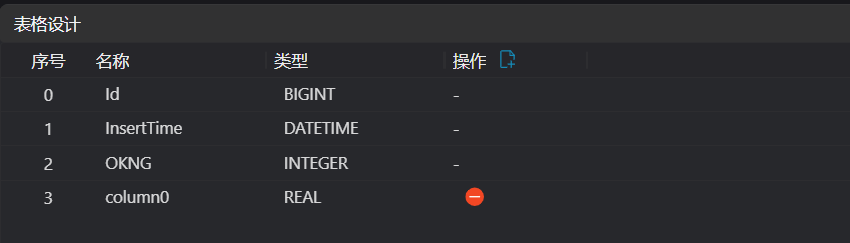
Note
- Index values 0-2 are fixed and cannot be changed. Starting from the third row, names can be customized.
| Parameter | Range | Default | Description | Diagram |
|---|---|---|---|---|
| Index | ||||
| Name | column0 | Column name in the table | ||
| Type | Displays the SQLite data type of this column |
Troubleshooting
| Index | Error Message | Related Parameter | Solution |
|---|---|---|---|
| 1 | Parameter "xxx" cannot be empty. | Parameter Name | Enter the xxx parameter. |
| 2 | Table "xxx" already exists. | Table Name | Delete the existing data table or change the name of the table to be created. |
| 3 | Invalid SQL statement: xxx. | Error Message | Check the parameter settings in Table Design. |
| 4 | The data table must be created in the currently opened project. | The data table is created in the current project directory. You must save the project as a project file before creating a data table. |