
Save Image
Parameter Introduction
Input Parameters

| Parameter | Range | Default Value | Description | Illustration |
|---|---|---|---|---|
| Input Image | 0-8 | 0 | Specify which IM to get the point cloud from |
Calculation Parameters
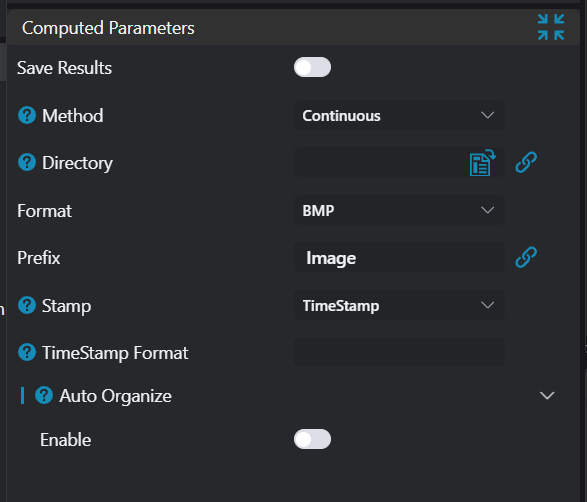
| Parameter | Range | Default Value | Description | Illustration |
|---|---|---|---|---|
| Save Result | true/false | false | Not yet implementedtrue: Save original image and display layers on the image false: Only save original image | |
| Method | Fixed File/Continuous File | Fixed File | Fixed File: Save to specified file Continuous: Save to specified folder, file name automatically generated according to configuration. | |
| File | Specify file path | |||
| Directory | Specify folder path | |||
| File Format | BMP/JPEG/PNG/TIFF | BMP | ||
| Prefix | Image | Prefix for automatically generated file names | ||
| Stamp | Timestamp/Index | Timestamp | Suffix for automatically generated file names | |
| Timestamp Format | Set the format of timestamp | |||
| Maximum Index | 10 | Upper limit of index for file name suffixNote: When the number of saved files exceeds the upper limit, it will overwrite and save starting from the image file with the smallest index | ||
| Auto Classification.Enable | true/false | false | Automatically generate and save to subfolders according to configuration | |
| Auto Classification.Method | By Date/Custom | By Date | Select classification method | |
| Auto Classification.Delete Expired Files | true/false | false | Enable automatic deletion of expired files | |
| Auto Classification.File Retention Days | 1-100 | 10 | When Delete Expired Files is enabled, set the number of days to retain files | |
| Auto Classification.Date Format | Set the date format, leaving blank is equivalent to %Y_%m_%dWhen Delete Expired Files is enabled, the range is limited to: %Y_%m_%d/%Y%m%d/%Y%m_%d | |||
| Auto Classification.Custom | %Y_%m_%d | Custom folder structure, time can be represented using placeholders |
Format String Placeholder Definitions
| Placeholder | Explanation | Placeholder | Explanation |
|---|---|---|---|
| %w | Abbreviated weekday (Mon, Tue, ...) | %a | am/pm |
| %W | Full weekday (Monday, Tuesday, ...) | %A | AM/PM |
| %b | Abbreviated month (Jan, Feb, ...) | %M | Minute (00 .. 59) |
| %B | Full month (January, February, ...) | %S | Second (00 .. 59) |
| %d | Zero-padded date (01 .. 31) | %s | Second and microsecond (equivalent to %S.%F) |
| %e | Date (1 .. 31) | %i | Millisecond (000 .. 999) |
| %f | Space-padded date ( 1 .. 31) | %c | Centisecond (0 .. 9) |
| %m | Zero-padded month (01 .. 12) | %F | Fractional second/microsecond (000000 - 999999) |
| %n | Month (1 .. 12) | %z | Timezone offset in ISO 8601 format (Z or +NN.NN) |
| %o | Space-padded month ( 1 .. 12) | %Z | Timezone offset in RFC format (GMT or +NNNN) |
| %y | Two-digit year (70) | %% | Percent sign |
| %Y | Four-digit year (1970) | ||
| %H | Hour, 24-hour clock (00 .. 23) | ||
| %h | Hour, 12-hour clock (00 .. 12) |
Exception Troubleshooting
| No. | Exception Information | Corresponding Parameter | Solution |
|---|---|---|---|
| 1 | Parameter "xxx" cannot be empty | Parameter name | Enter the xxx parameter. |
| 2 | Folder "xxx" does not exist or cannot be accessed | File/Directory | Ensure the specified folder exists and has read/write permissions. |
| 3 | File "xxx" cannot be created or written | File/Directory | Ensure the specified file has read/write permissions, and its containing folder exists and has read/write permissions. |
| 4 | Image in IM "xxx" is not a 2D image | Input Image | Ensure the image in the specified IM is a 2D image. |
| 5 | Failed to write image to file "xxx" | File/Directory | Unknown exception, possibly the file is being used by other software. |