
聯結器Pin針正位度檢測
專案簡介
專案背景
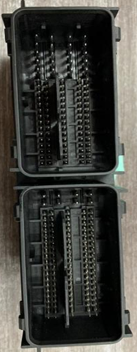
汽車聯結器外形複雜,部分PIN針會被外殼包圍,且PIN針十分微小,針尖細,具有高反射性,檢測難度高。經過質檢的PIN針直接影響後續產品的裝配,導致最終產品在使用時出現連線不穩定、接觸不良或直接報廢。
相機選型
LMI雷射線掃相機 Gocator2430
檢測要求
測量精度 ≤ 0.02mm
測量重複性 ≤ 0.004mm
測量週期 ≤ 1s
解決方案
Vision-Studio採用Pin針匹配整合運算元,一鍵得出所有的Pin高度並判斷是否符合標準,降低了使用者的使用難度同時提升工程執行速度。
設計思路

執行效果展示
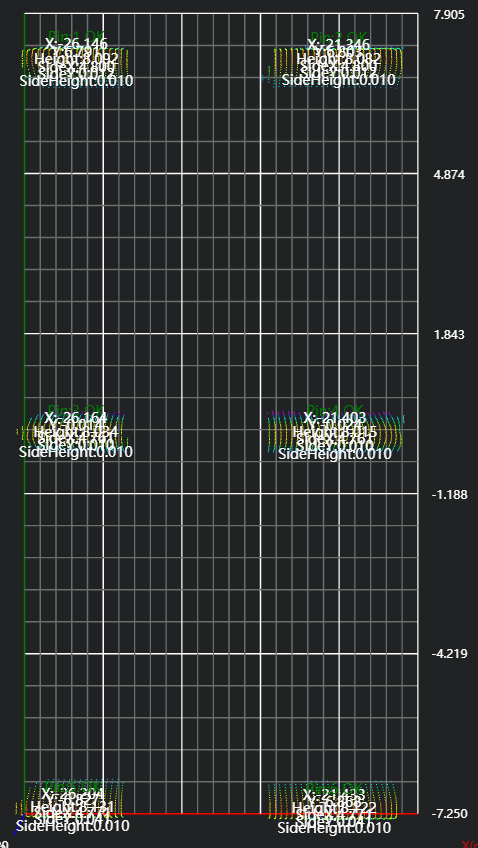
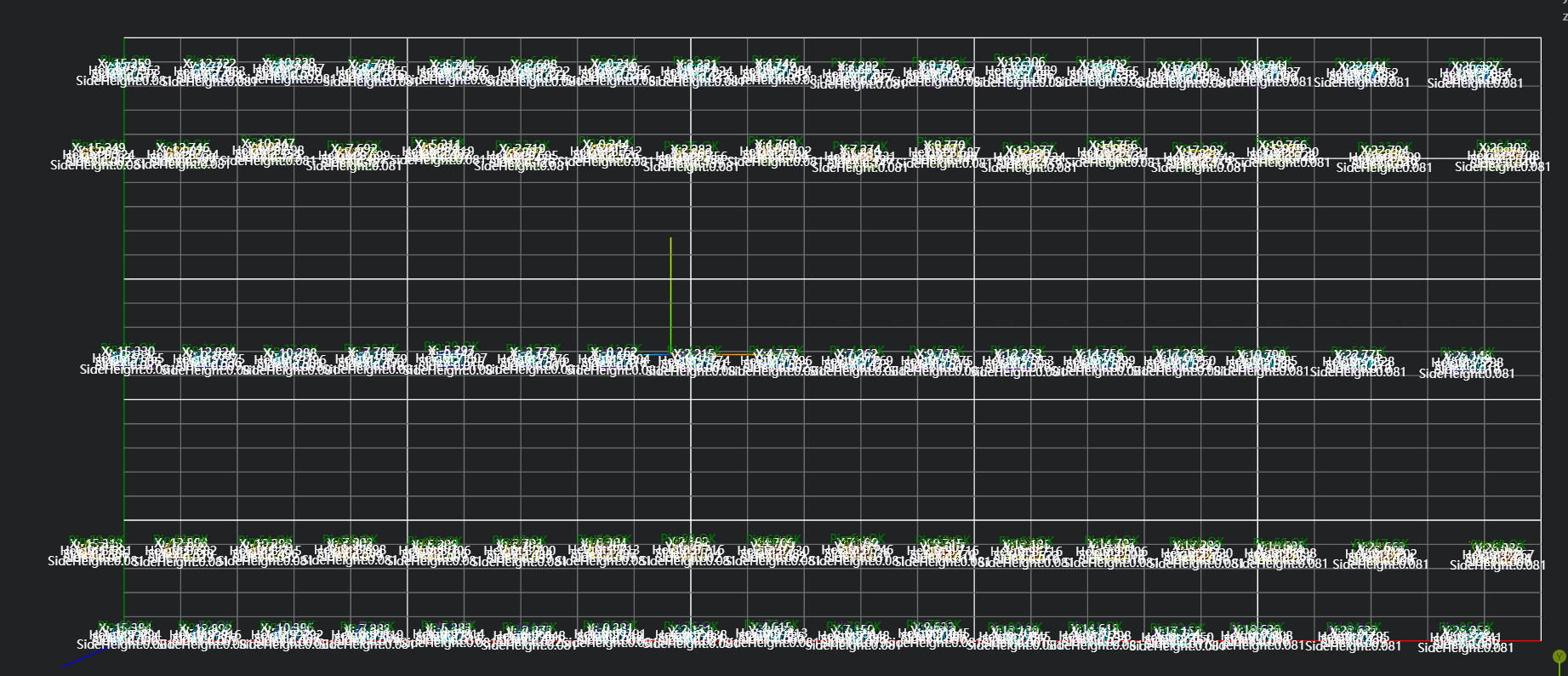
工程結果展示:
左邊部分:
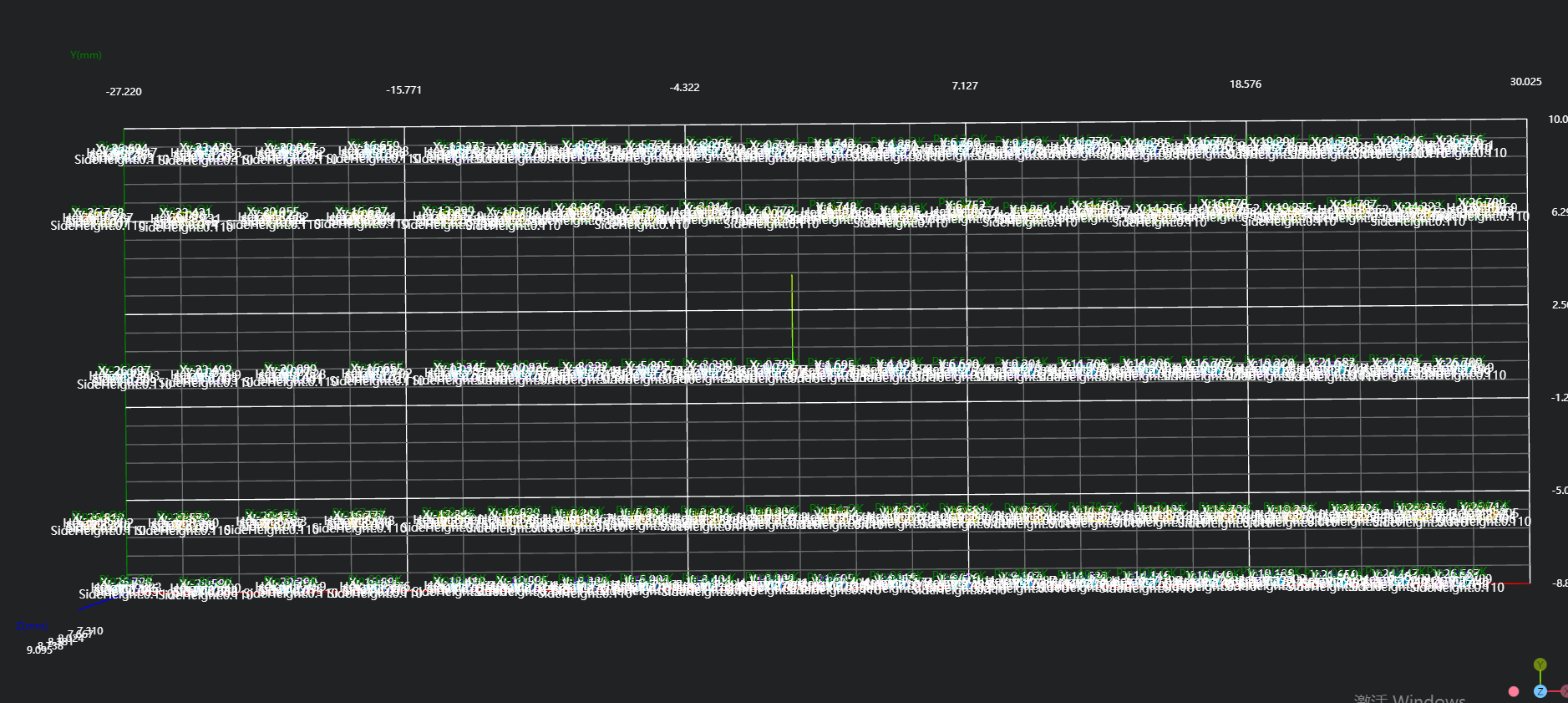
右邊部分:
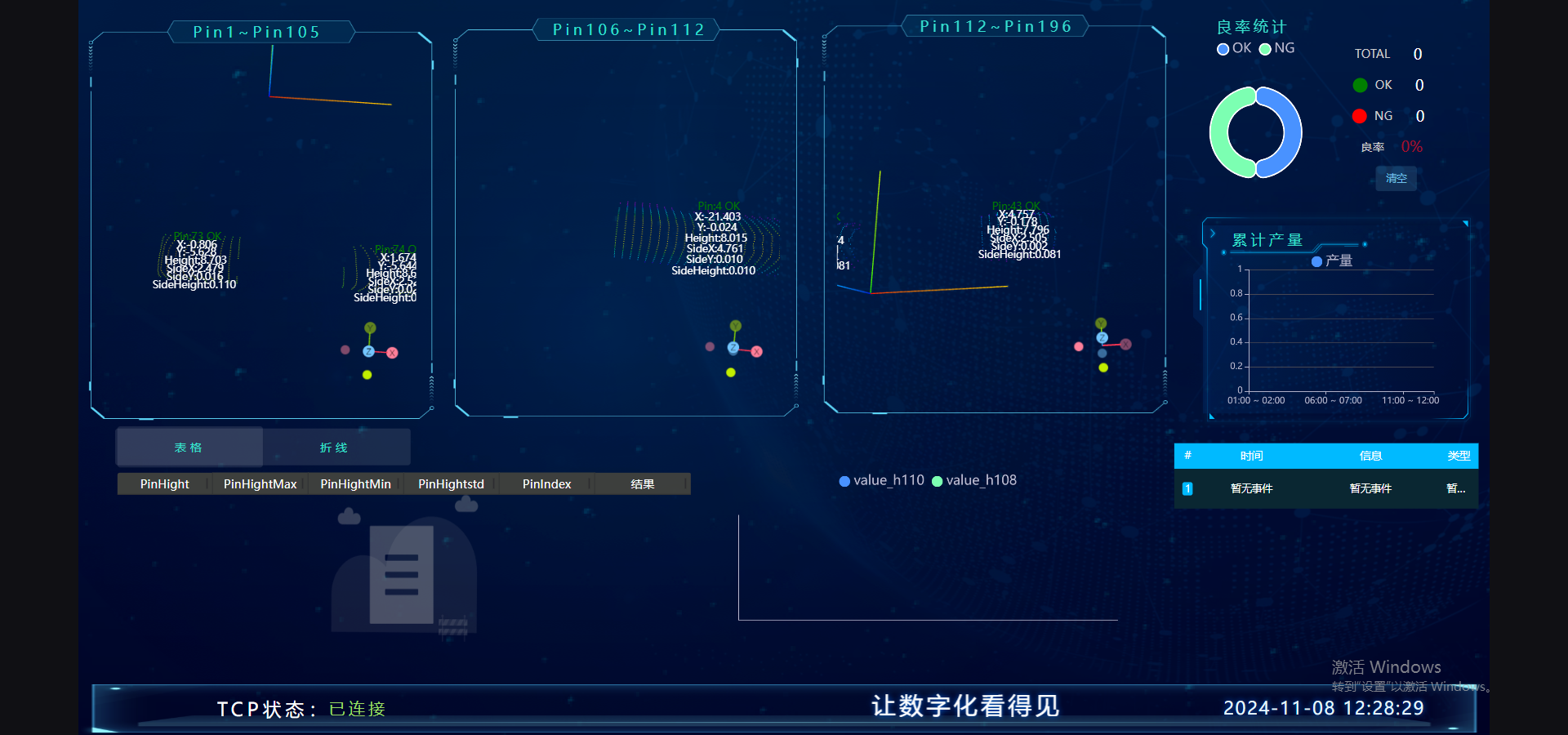
HMI結果展示:
專案流程
一、初始化
- 選擇
Lua脚本语言工具,全域性變數初始化,建立待接收資料的csv檔案。
經驗
.. 用於string型別字串拼接
part1 = "Hello, "
part2 = "world!"
result = part1 .. part2
print(result) # 輸出: Hello, world!
,作為分隔符,分割每個資料項
--生成用于拼接的字符串
write = ""

--定义csv的列头内容
csvHead = "Time,"
for i=1,196,1 do
    csvHead = csvHead .. "pin" .. i .. ","
end
csvHead = csvHead .. "\n"

--创建y文件,脚本第一次运行时,没有就创建
if FileExists("./196pin_X.csv") == false then
    PrintToFile("./196pin_X.csv", csvHead)
end

--创建y文件
if FileExists("./196pin_Y.csv") == false then
    PrintToFile("./196pin_Y.csv", csvHead)
end

--创建H文件
if FileExists("./196pin_H.csv") == false then
    PrintToFile("./196pin_H.csv", csvHead)
end

--创建SideX文件
if FileExists("./196pin_SideX.csv") == false then
    PrintToFile("./196pin_SideX.csv", csvHead)
end

--创建SideY文件
if FileExists("./196pin_SideY.csv") == false then
    PrintToFile("./196pin_SideY.csv", csvHead)
end

--创建SideH文件
if FileExists("./196pin_SideH.csv") == false then
    PrintToFile("./196pin_SideH.csv", csvHead)
end

--创建Result文件
if FileExists("./196pin_Result.csv") == false then
    PrintToFile("./196pin_Result.csv", csvHead)
end選擇
加载点云工具,獲取點雲。選擇
3D裁切工具,將點雲複製一份到IM1(IM0不動,後面可以再次使用)。選擇
3D变换工具,將點雲進行90度的旋轉。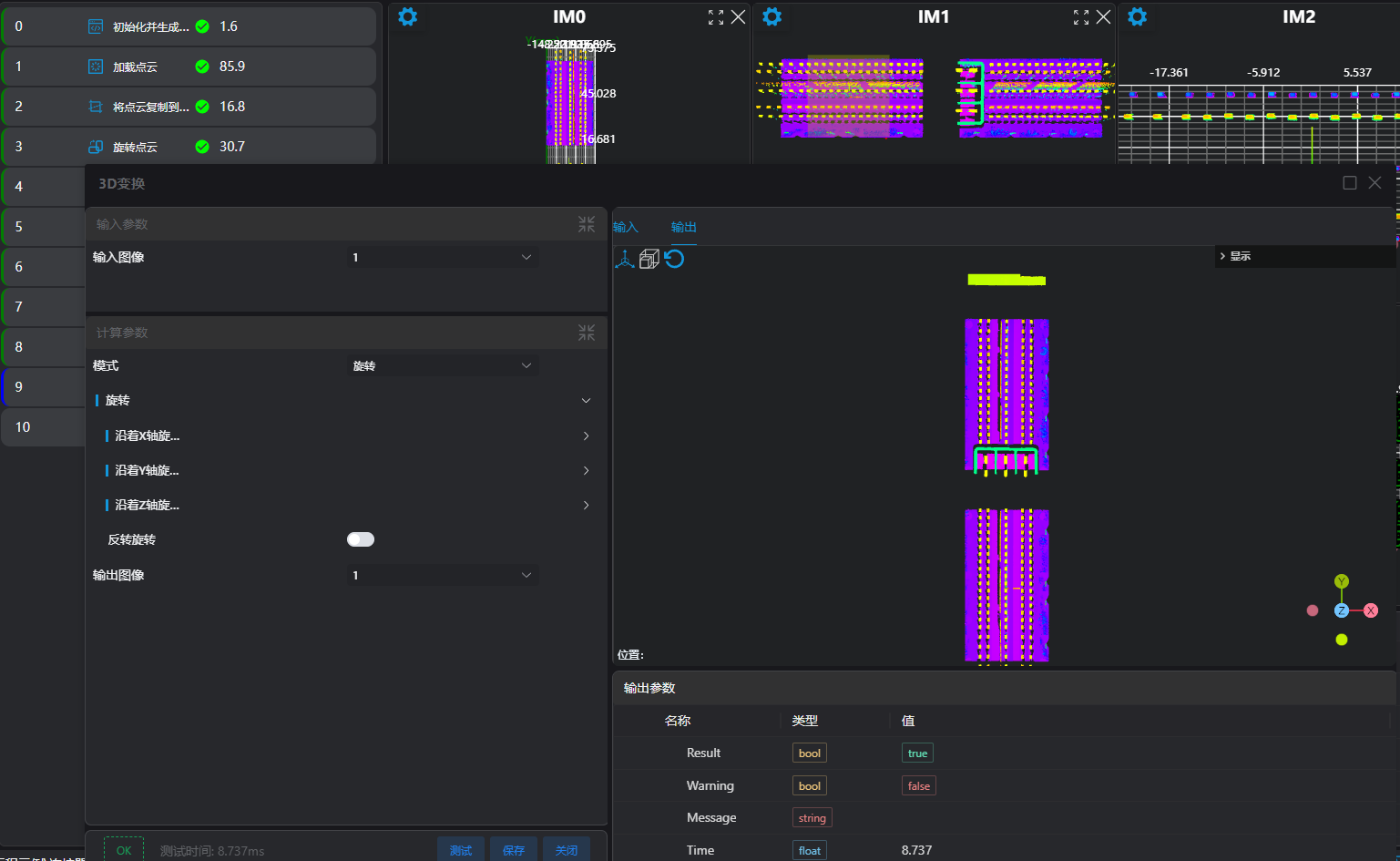
選擇
3D裁切工具,將IM1點雲複製到IM3,用於右邊部分定位及Pin針測量。
二、預處理
選擇
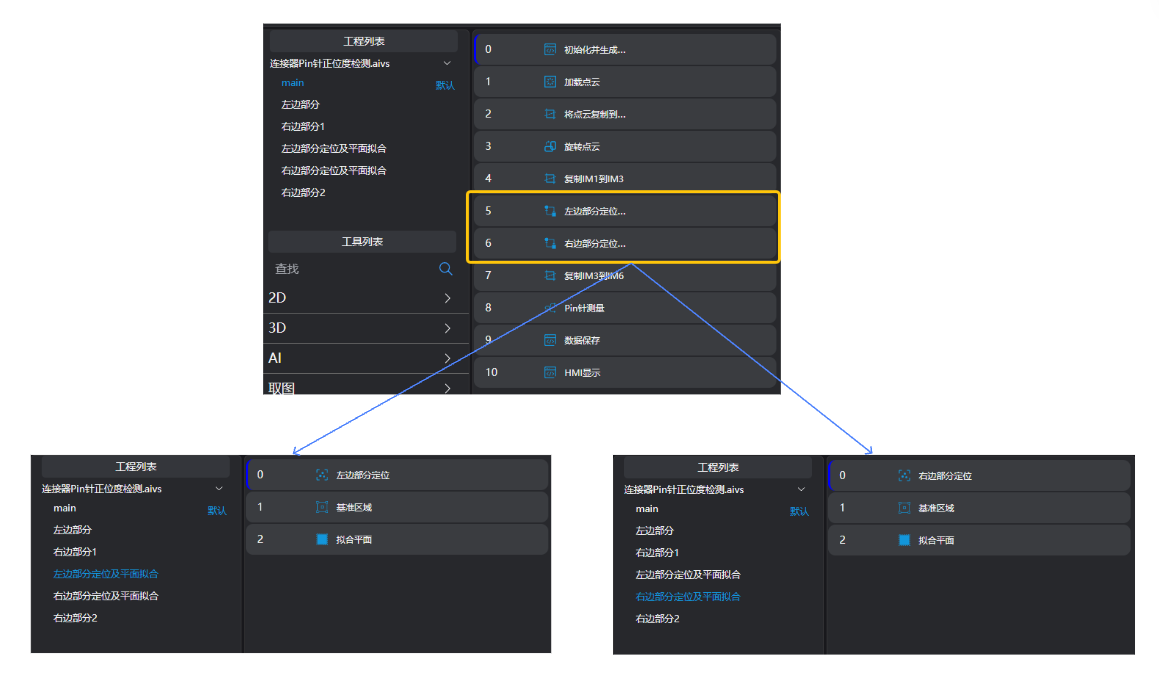
多点定位工具,選擇4個邊界的pin針,通過4個Pin針的位置計算出中心位置,根據中心位置進行點雲XY位置調整。選擇
3D区域工具,根據現場要求選擇區域,合併成一個大的區域並輸出到暫存器中。選擇
3D平面工具,繫結3D区域工具輸出的區域,擬合平面。
三、三個區域Pin針測量
- 選擇
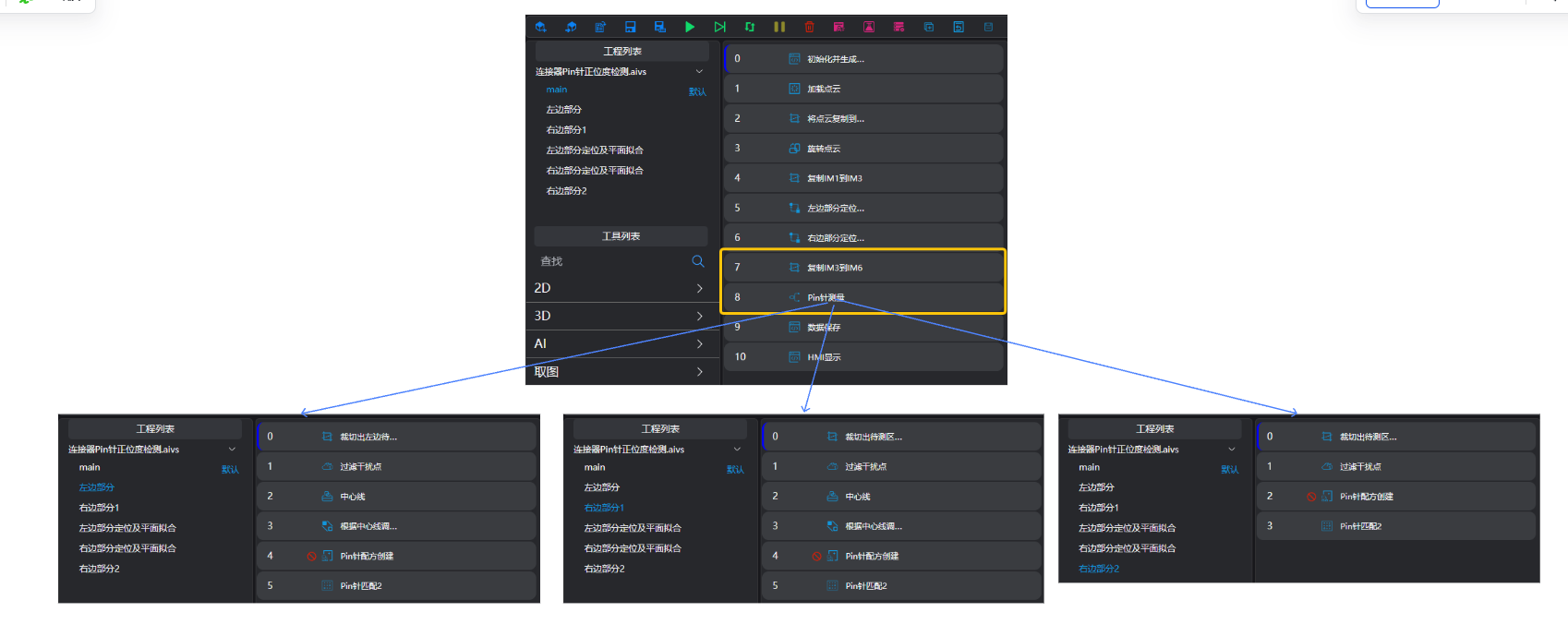
3D裁切工具複製IM3點雲到IM6:用於右邊第二部分的Pin針測量
提示
使用並行呼叫子程式時,每個子程式需要在不同的IM執行。
選擇
3D离群点滤波工具,去除待測Pin針區域周圍的噪點。選擇
3D方形探针工具,選擇中間一行pin針,根據選取到的pin針的中心點座標,擬合一條直線。
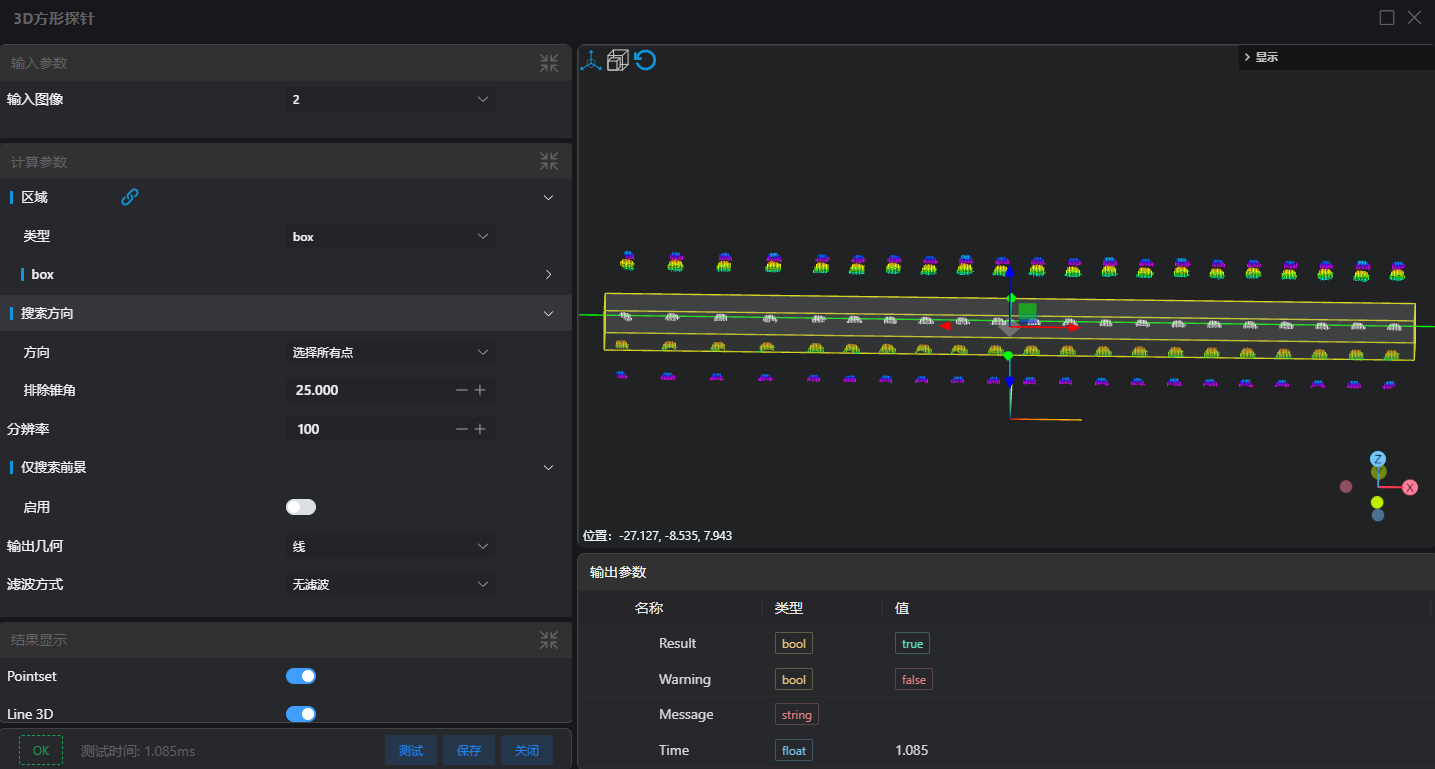
選擇
3D位置调整工具,根據上一步輸出的直線,調整點雲XY位置。選擇
Pin针配方创建工具,設定box框選待檢測區域Pin針,設定Pin針引數,輸出當前Pin針區域的配方檔案。
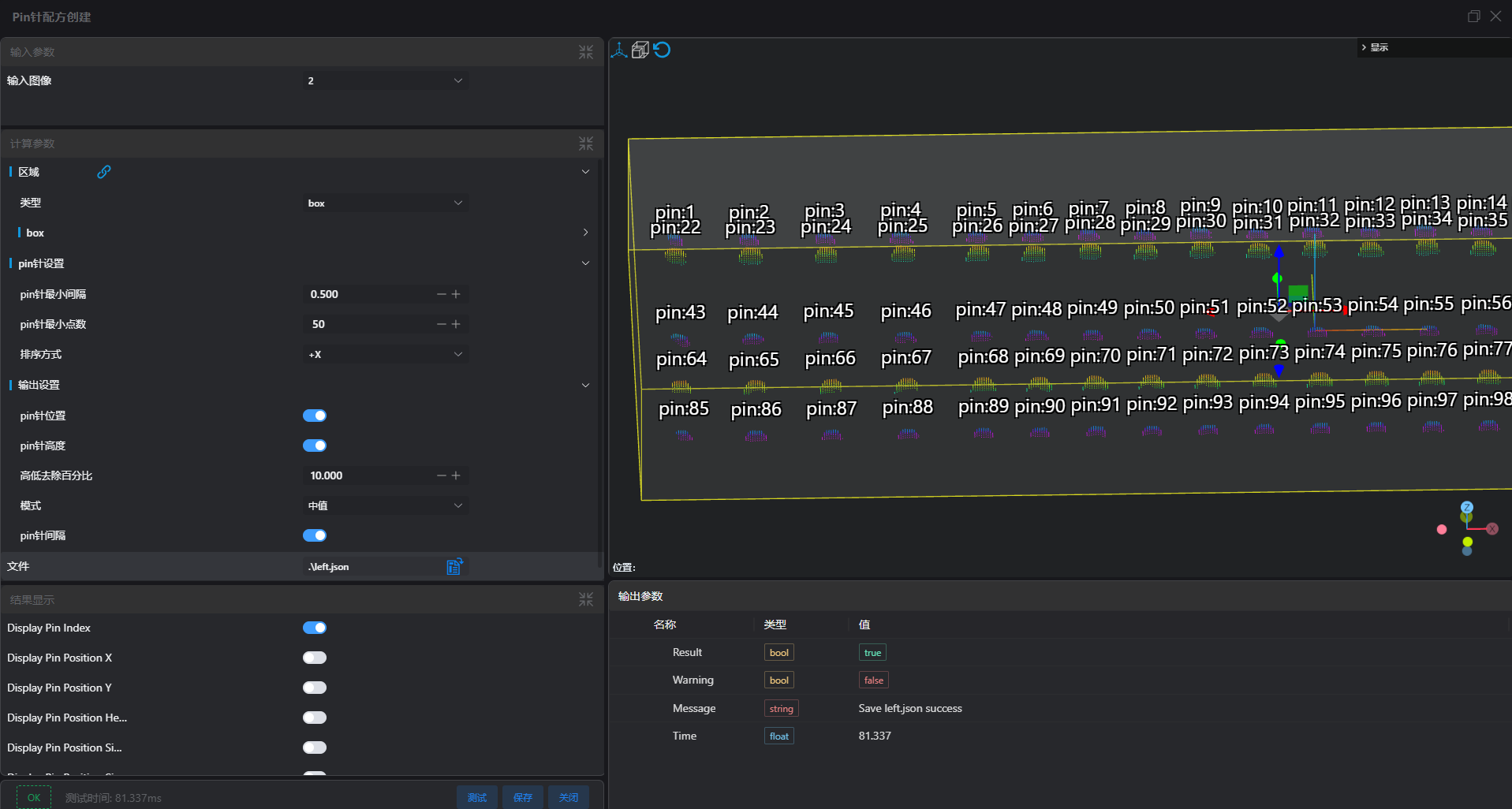
- 選擇
Pin针匹配2工具,設定box框選待檢測區域Pin針,設定Pin針引數,設定配方比對並選擇上一步輸出的配方檔案。
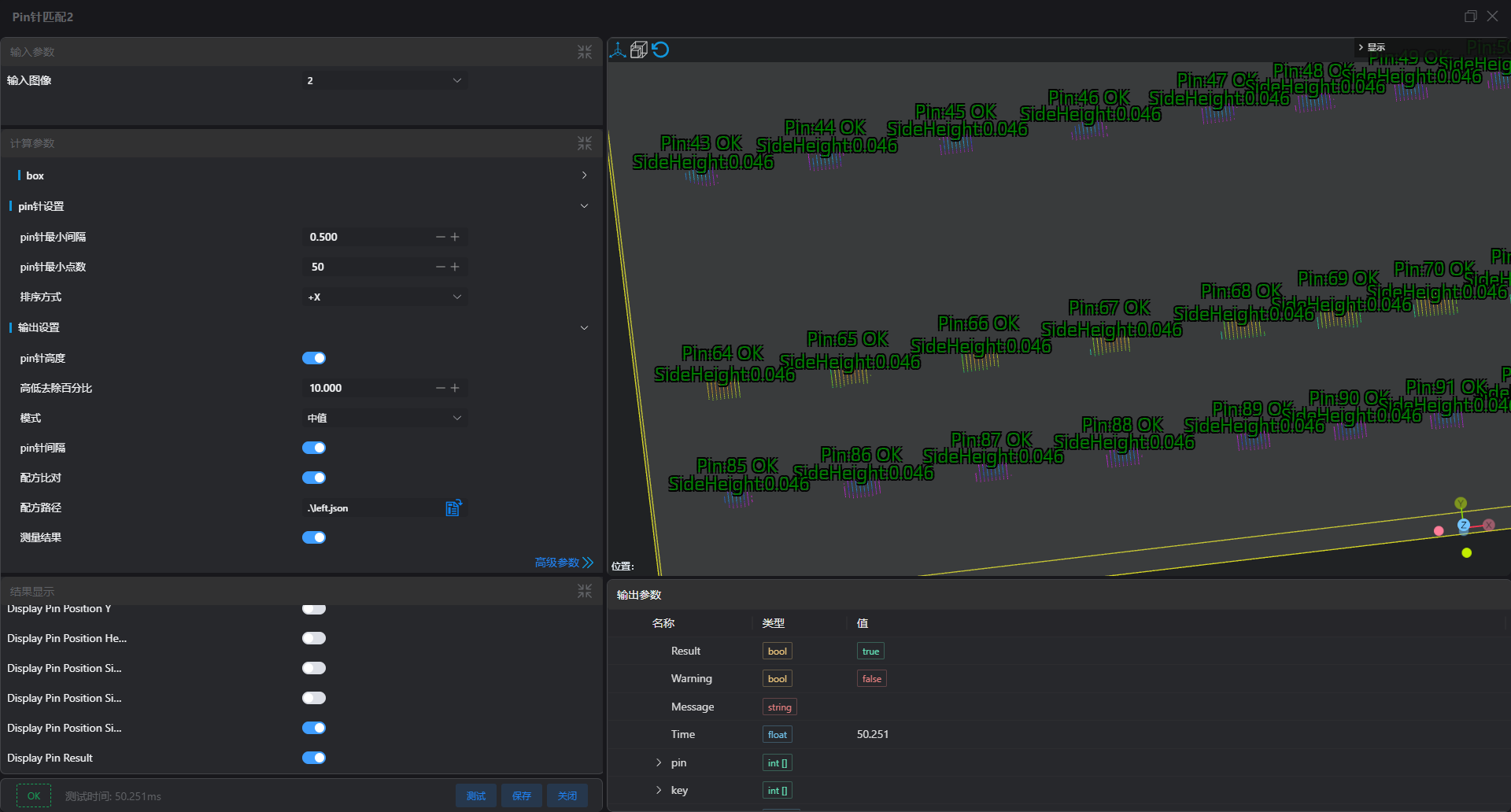
右邊部分處理邏輯和左半部分的一樣,可參考該節的流程。
四、結果儲存csv及資料庫中
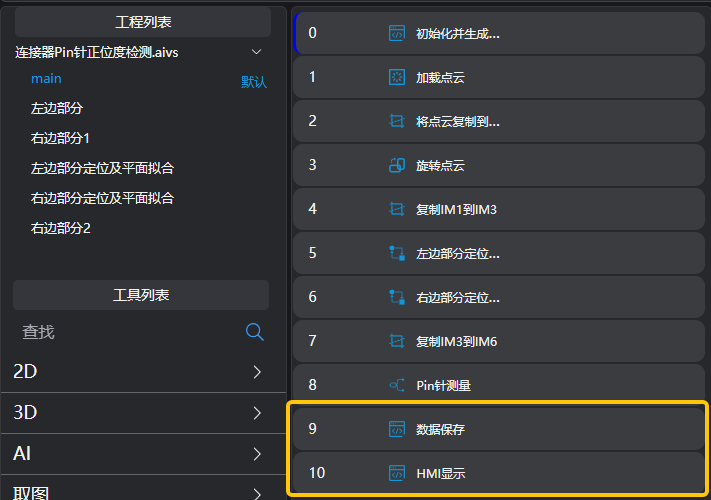
- 資料儲存到csv檔案:選擇
lua语言脚本工具
繫結三個
Pin针匹配工具輸出的結果變數,繫結判斷是否儲存csv的全域性變數編輯lua指令碼,設定七個變數,分別用來拼接位置資訊,高度資訊,Pin針間隔資訊,測量結果。
儲存結果到csv檔案
經驗
string.format 用於格式化字串 %.nf表示將浮點數格式化為保留 n 位小數。
pi = 3.14159 str = string.format("Pi is approximately %.3f", pi) print(str) -- 輸出: Pi is approximately 3.141
-- 保存到csv

--获取当前时间
time = os.date("%Y_%m_%d %H:%M:%S") .. ","
write_x = time
write_y = time
write_h = time
write_sidex = time
write_sidey = time
write_sideh = time
write_result = time


--获取1-105pin的数据
for i = 1, 105, 1 do
    -- 获取保存到csv数据
    --string.format中已经有了"%f,"格式,不需要再单独添加","
    write_x = write_x .. string.format("%.3f,", Pin_1_105.pin_position_x[i])
    write_y = write_y .. string.format("%.3f,", Pin_1_105.pin_position_y[i])
    write_h = write_h .. string.format("%.3f,", Pin_1_105.pin_position_height[i])
    write_sidex = write_sidex .. string.format("%.3f,", Pin_1_105.pin_position_side_x[i])
    write_sidey = write_sidey .. string.format("%.3f,", Pin_1_105.pin_position_side_y[i])
    write_sideh = write_sideh .. string.format("%.3f,", Pin_1_105.pin_position_side_height[i])
    write_result = write_result .. Pin_1_105.pin_result[i] .. ","
end


--获取106-111pin的数据
for i = 1, 6, 1 do
    -- 获取保存到csv数据
    write_x = write_x .. string.format("%.3f,", Pin_106_111.pin_position_x[i])
    write_y = write_y .. string.format("%.3f,", Pin_106_111.pin_position_y[i])
    write_h = write_h .. string.format("%.3f,", Pin_106_111.pin_position_height[i])
    write_sidex = write_sidex .. string.format("%.3f,", Pin_106_111.pin_position_side_x[i])
    write_sidey = write_sidey .. string.format("%.3f,", Pin_106_111.pin_position_side_y[i])
    write_sideh = write_sideh .. string.format("%.3f,", Pin_106_111.pin_position_side_height[i])
    write_result = write_result .. Pin_106_111.pin_result[i] .. ","
end

--获取112-196pin的数据
for i = 1, 85, 1 do
    -- 获取保存到csv数据
    write_x = write_x .. string.format("%.3f,", Pin_112_196.pin_position_x[i])
    write_y = write_y .. string.format("%.3f,", Pin_112_196.pin_position_y[i])
    write_h = write_h .. string.format("%.3f,", Pin_112_196.pin_position_height[i])
    write_sidex = write_sidex .. string.format("%.3f,", Pin_112_196.pin_position_side_x[i])
    write_sidey = write_sidey .. string.format("%.3f,", Pin_112_196.pin_position_side_y[i])
    write_sideh = write_sideh .. string.format("%.3f,", Pin_112_196.pin_position_side_height[i])
    write_result = write_result .. Pin_112_196.pin_result[i] .. ","
end

--保存到csv,每个检测结束后都添加一个换行符
write_x = write_x
write_y = write_y
write_h = write_h
write_sidex = write_sidex
write_sidey = write_sidey
write_sideh = write_sideh
write_result = write_result

--HMI来控制是否保存csv文件
if isSaveCSV == 1 then
    WriteLineToFile("./196pin_X.csv", write_x)
    WriteLineToFile("./196pin_Y.csv", write_y)
    WriteLineToFile("./196pin_H.csv", write_h)
    WriteLineToFile("./196pin_SideX.csv", write_sidex)
    WriteLineToFile("./196pin_SideY.csv", write_sidey)
    WriteLineToFile("./196pin_SideH.csv", write_sideh)
    WriteLineToFile("./196pin_Result.csv", write_result)
end- 儲存結果用於HMI顯示:選擇
lua语言脚本工具
繫結三個
Pin针匹配工具輸出的結果變數建立空陣列分別用於儲存Pin針高度,OKNG資料以及所有輸出資料到資料庫
迴圈獲取三個
Pin针匹配工具輸出結果,儲存資料到建立的空陣列;儲存用於儲存所有資料陣列在全域性變數,用於HNI呼叫顯示;高度資料及OKNG結果寫入資料庫
經驗
table.insert 是 Lua 中用於向表中插入元素的函式 table.insert(table1, [pos,] value) table1:需要插入元素的表。 pos(可選):插入位置。如果不提供,預設將值追加到表的末尾。 value:要插入的值。
local table1 = {"w", "b"} table.insert(table1, "v") -- 在末尾插入 "v" print(table1) -- 輸出: ["w","b","v",] print(table1[1]) -- 輸出: w
-- HMI显示

--定义方法:判断数组中是否有指定数据。
function tableContains(tab, val)
    for index, value in ipairs(tab) do
        if value == val then
            return true
        end
    end
    return false
end

-- 定义存数据库的变量
local sqlData = {}
local dataResult = {}
local currentTable = {}

--获取1-105pin的数据
for i = 1, 105, 1 do
    --保存测量变量,用于HMI显示,取哪几个pin的数据,需要根据实际情况来写if的条件
    if i % 21 == 0 or i % 21 == 1 then
        SetFloatVariable("value_h" .. tostring(i), Pin_1_105.pin_position_height[i])
        pinRecipe = GetRecipeSet(i - 1)
        local table1 = {}
        table1["PinIndex"] = "H" .. tostring(i)
        table1["PinHightStd"] = string.format("%.3f", pinRecipe.PinHight)
        table1["PinHightMax"] = pinRecipe.PinHightMax
        table1["PinHightMin"] = pinRecipe.PinHightMin * -1
        table1["PinHight"] = string.format("%.3f", Pin_1_105.pin_position_height[i])
        table1["result"] = Pin_1_105.pin_result[i]

        --数组中插入数据 OK 高度 目前所有变量
        table.insert(dataResult, Pin_1_105.pin_result[i])
        table.insert(sqlData, Pin_1_105.pin_position_height[i])
        table.insert(currentTable, table1)
    end
end


--获取106-111pin的数据
for i = 1, 6, 1 do
    SetFloatVariable("value_h" .. tostring(i + 105), Pin_106_111.pin_position_height[i])
    pinRecipe = GetRecipeSet(i + 105 - 1)
    local table1 = {}
    table1["PinIndex"] = "H" .. tostring(i + 105)
    table1["PinHightStd"] = string.format("%.3f", pinRecipe.PinHight)
    table1["PinHightMax"] = pinRecipe.PinHightMax
    table1["PinHightMin"] = pinRecipe.PinHightMin * -1
    table1["PinHight"] = string.format("%.3f", Pin_106_111.pin_position_height[i])
    table1["result"] = Pin_106_111.pin_result[i]

    table.insert(dataResult, Pin_106_111.pin_result[i])
    table.insert(sqlData, Pin_106_111.pin_position_height[i])
    table.insert(currentTable, table1)
end

--获取112-196pin的数据
for i = 1, 85, 1 do
    --保存测量变量,用于HMI显示
    if i % 17 == 0 or i % 17 == 1 then
        SetFloatVariable("value_h" .. tostring(i + 111), Pin_112_196.pin_position_height[i])
        pinRecipe = GetRecipeSet(i + 111 - 1)
        local table1 = {}
        table1["PinIndex"] = "H" .. tostring(i + 111)
        table1["PinHightStd"] = string.format("%.3f", pinRecipe.PinHight)
        table1["PinHightMax"] = pinRecipe.PinHightMax
        table1["PinHightMin"] = pinRecipe.PinHightMin * -1
        table1["PinHight"] = string.format("%.3f", Pin_112_196.pin_position_height[i])
        table1["result"] = Pin_112_196.pin_result[i]

        table.insert(dataResult, Pin_112_196.pin_result[i])
        table.insert(sqlData, Pin_112_196.pin_position_height[i])
        table.insert(currentTable, table1)
    end
end

--保存实时显示到HMI的数据
--println(ConvertTableToJson(currentTable))
SetStringVariable("alltable", ConvertTableToJson(currentTable))

--保存到数据库的数据表头
fileds = { "h1", "h21", "h22", "h42", "h43", "h63", "h64", "h84", "h85", "h105", "h106", "h107", "h108", "h109",
    "h110", "h111", "h112", "h128", "h129", "h145", "h146", "h162", "h163", "h179", "h180", "h196", "OKNG" }

--脚本开头设置的方法使用:用来判断数组中是否有该数据
if tableContains(dataResult, "NG") then
    table.insert(sqlData, 0)
else
    table.insert(sqlData, 1)
end


--数据写入数据库中(高度结果)
WriteHmiData("196pin_H", fileds, sqlData)經驗提煉
核心步驟:
建立配方
根據配方匹配點雲並判斷結果