
閘片支撐板圓孔位置度
工程背景
測量背景
閘片支撐板尺寸檢測確保產品質量與安全,遵循行業標準,保障互換性與可靠性。通過精準測量,預防制造偏差,提升市 場競爭力。嚴格檢測助力最佳化設計,確保每一部件均達到最佳效能標準,為制動系統安全保駕護航。

相機選型
LMI雷射線掃相機 Gocator2350
測量項
1.閘片支撐板的長度
2.大圓孔到邊的距離
3.大圓孔到下方兩孔連線的距離
檢測要求
靜態重複精度 ≤ 0.003mm
動態重複精度 ≤ 0.01mm
解決方案
Vision-Studio採用3D孔工具,輸出每個孔的圓心座標,然後進行距離計算。操作簡單,零程式碼,部署快。
設計思路
執行效果展示
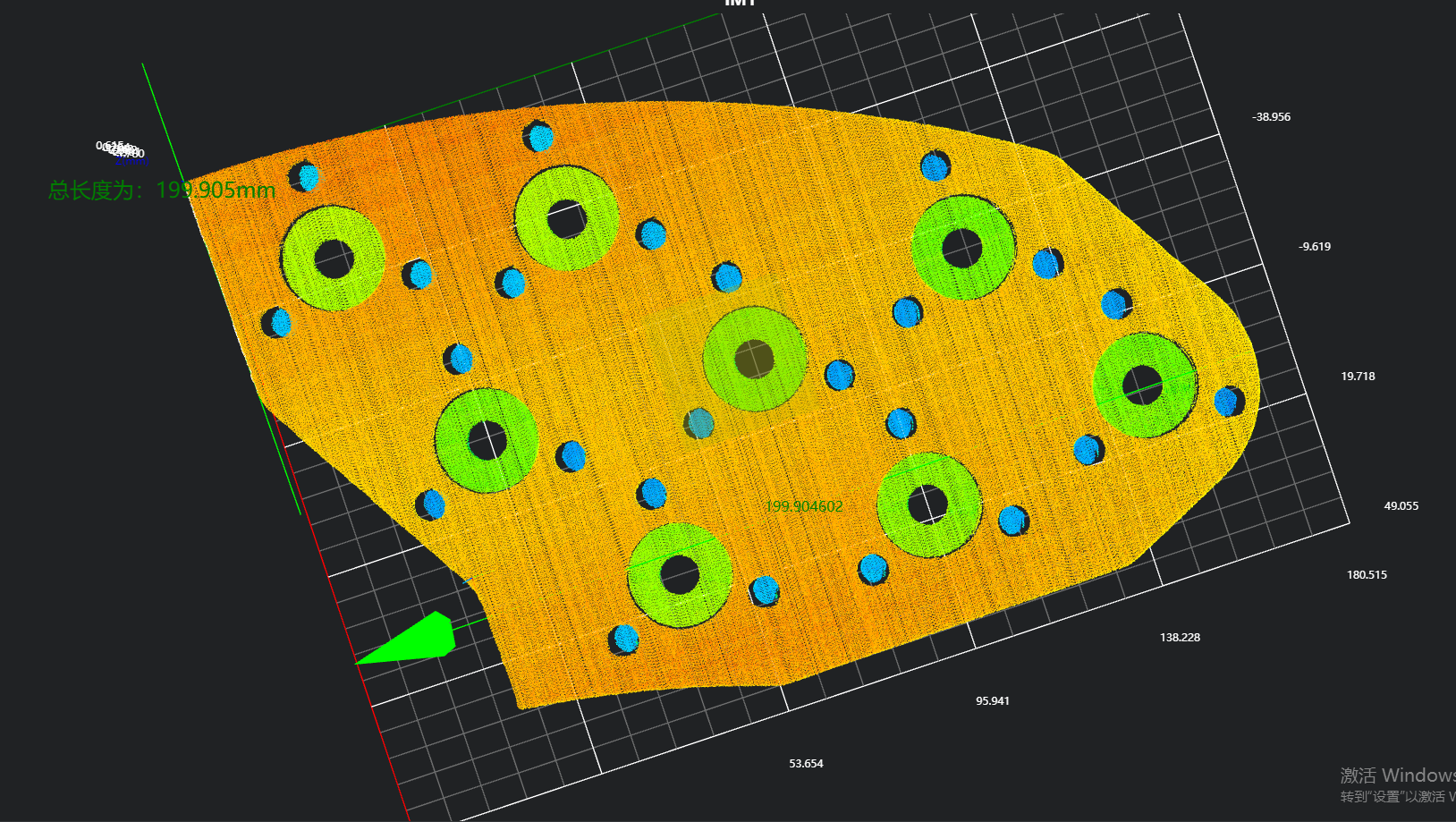
工程結果展示
- 長度結果
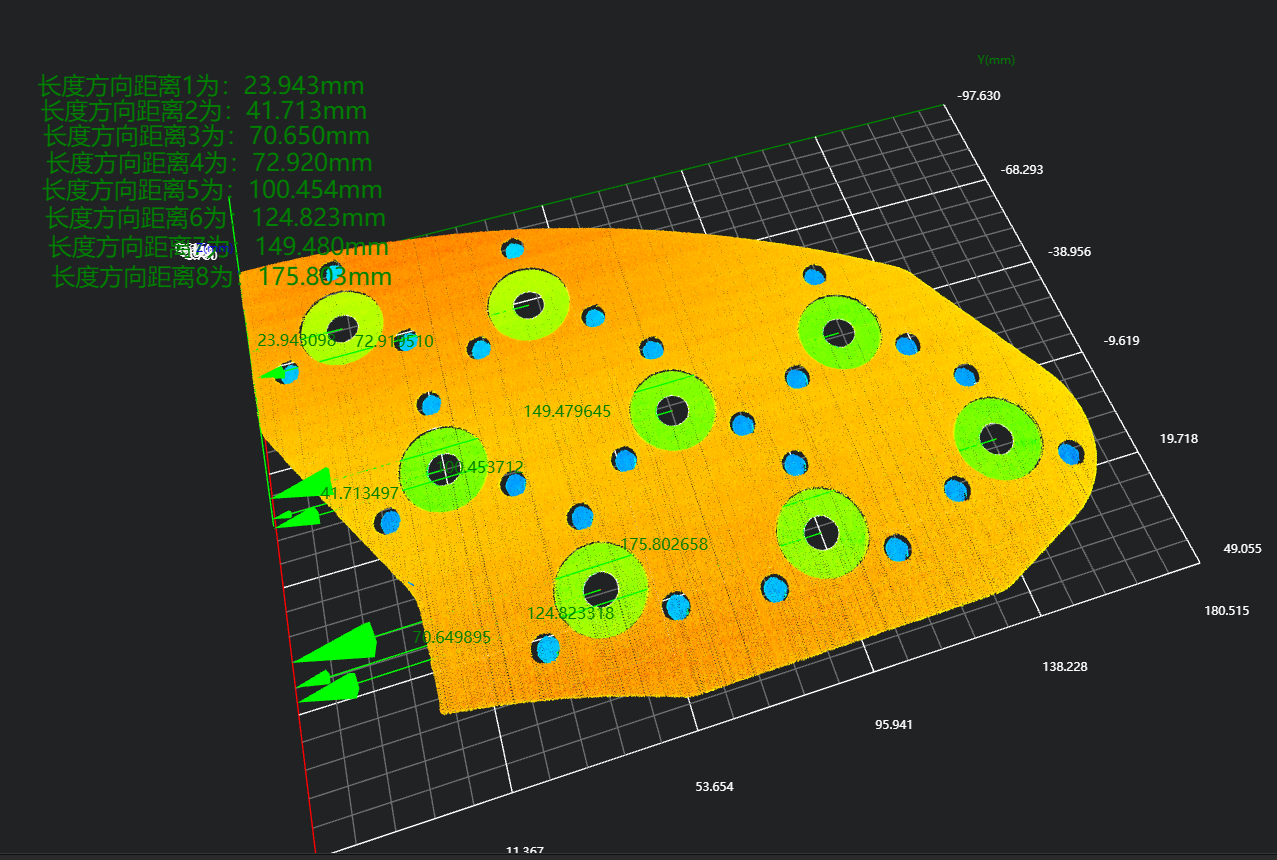
- 圓孔長度方向位置結果
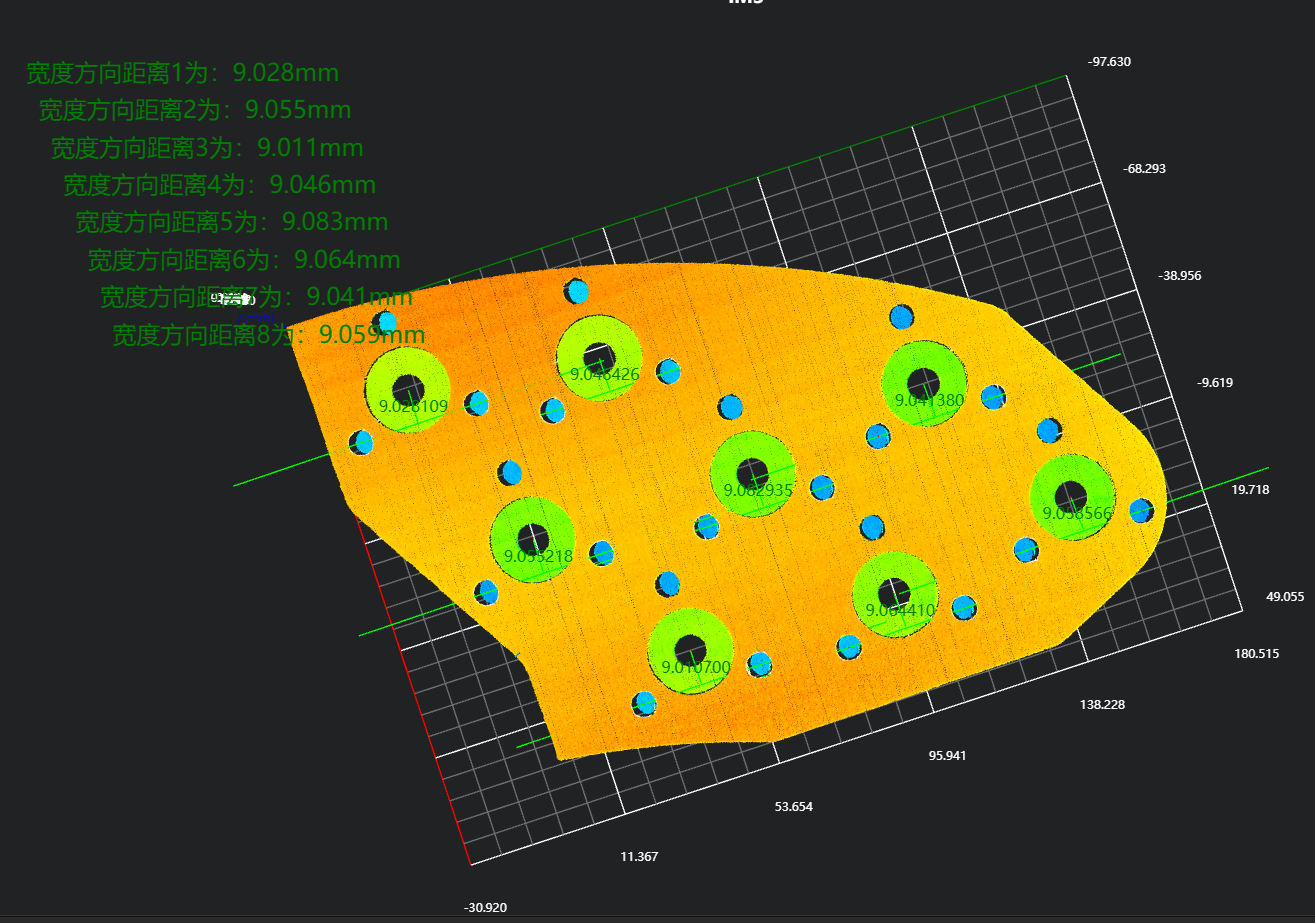
- 圓孔寬度方向位置結果
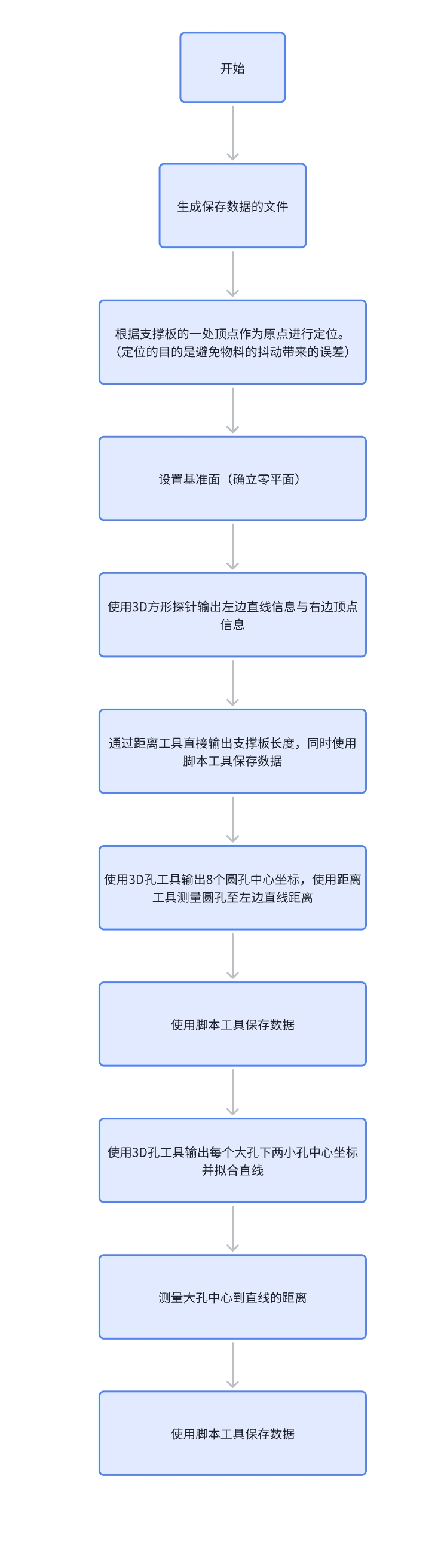
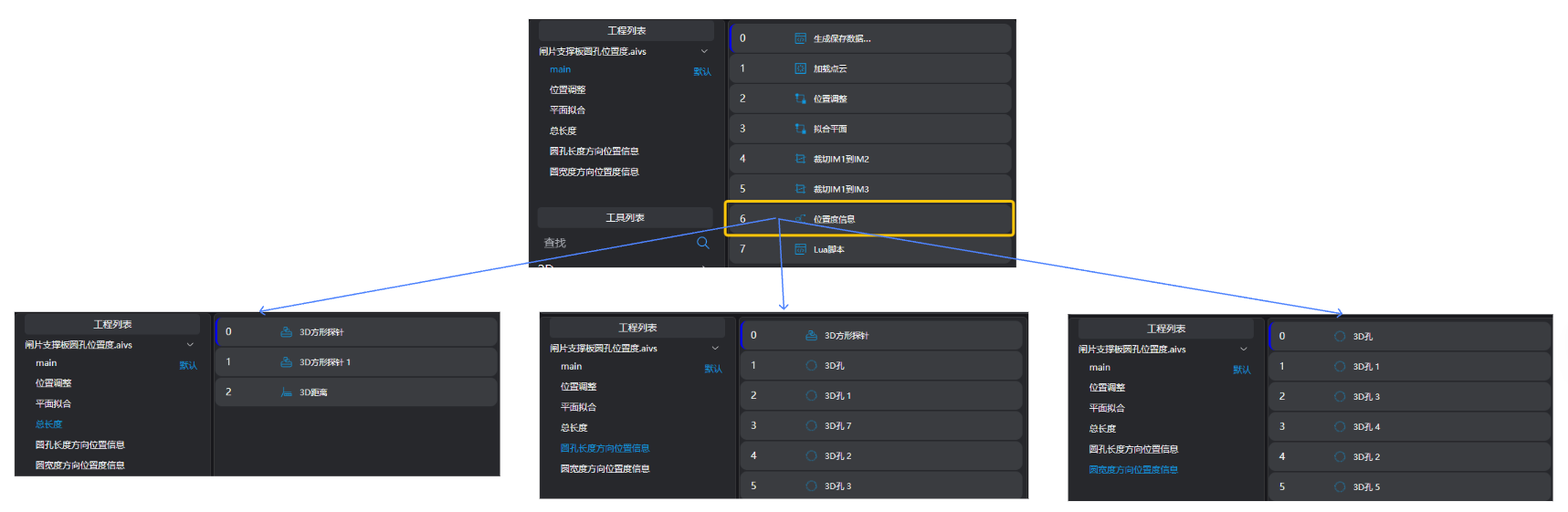
專案流程
一、初始化
- 使用
Lua脚本工具,生成儲存資料的csv檔案。
- 拼接表頭字串,儲存到csv檔案
經驗
.. 用於string型別字串拼接
part1 = "Hello, "
part2 = "world!"
result = part1 .. part2
print(result) # 輸出: Hello, world!
,作為分隔符,分割每個資料項
-- 生成保存检测数据的csv文件
-- 生成用于拼接的字符串
write = ""
-- 判断文件是否存在,若不存在,则生成该文件
if FileExists("./DistanceX.csv") == false then
    write = write .. "Time,"
    for i = 1,8,1 do
       write = write .. "x" .. i .. ","
    end
    -- "\n"表示换行
    write = write .. "\n"
end

write = write .. os.date("%Y_%m_%d %H:%M:%S") .. ","
-- 将字符串写入文件中
WriteToFile("./DistanceX.csv", write)

-- 生成保存检测数据的csv文件
-- 生成用于拼接的字符串
write = ""
-- 判断文件是否存在,若不存在,则生成该文件
if FileExists("./DistanceY.csv") == false then
    write = write .. "Time,"
    for i = 1,8,1 do
       write = write .. "y" .. i .. ","
    end
    -- "\n"表示换行
    write = write .. "\n"
end

write = write .. os.date("%Y_%m_%d %H:%M:%S") .. ","
-- 将字符串写入文件中
WriteToFile("./DistanceY.csv", write)

-- 生成保存检测数据的csv文件
-- 生成用于拼接的字符串
write = ""
-- 判断文件是否存在,若不存在,则生成该文件
if FileExists("./DistanceAll.csv") == false then
    write = write .. "Time,"
    write = write .. "Distance" .. ","
    -- "\n"表示换行
    write = write .. "\n"
end

write = write .. os.date("%Y_%m_%d %H:%M:%S") .. ","
-- 将字符串写入文件中
WriteToFile("./DistanceAll.csv", write)- 使用
加载点云工具,載入需要處理的點雲圖。
二、預處理
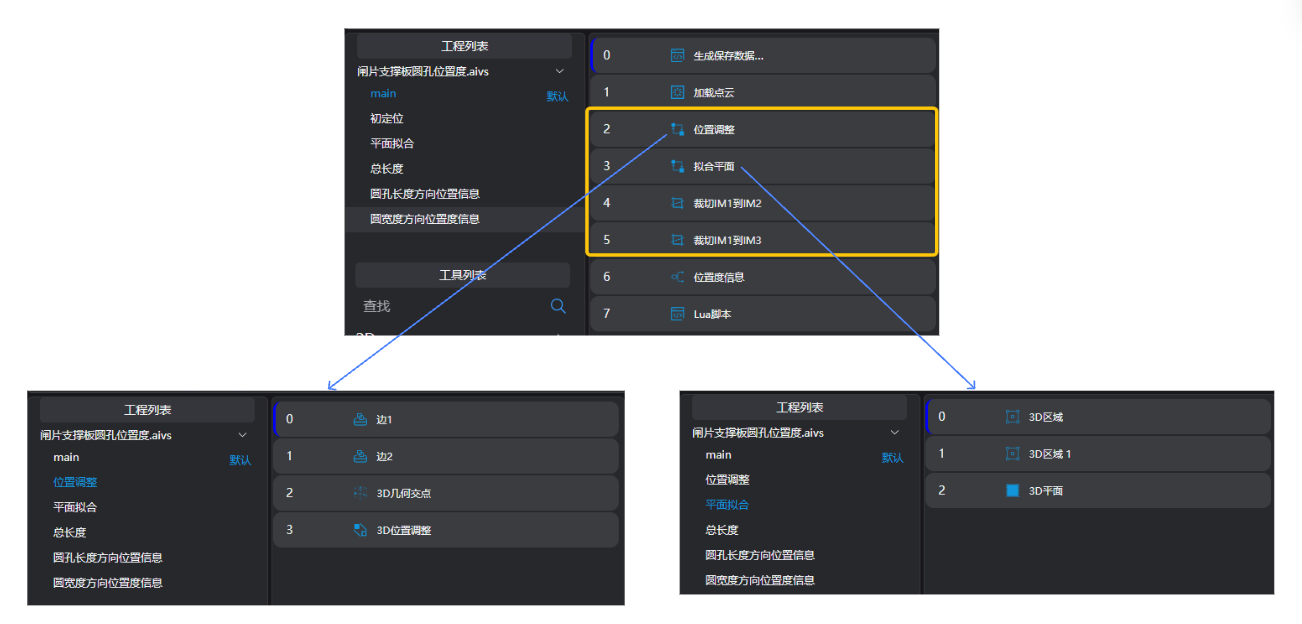
位置調整
使用
3D方形探针工具,得到工件的兩條邊。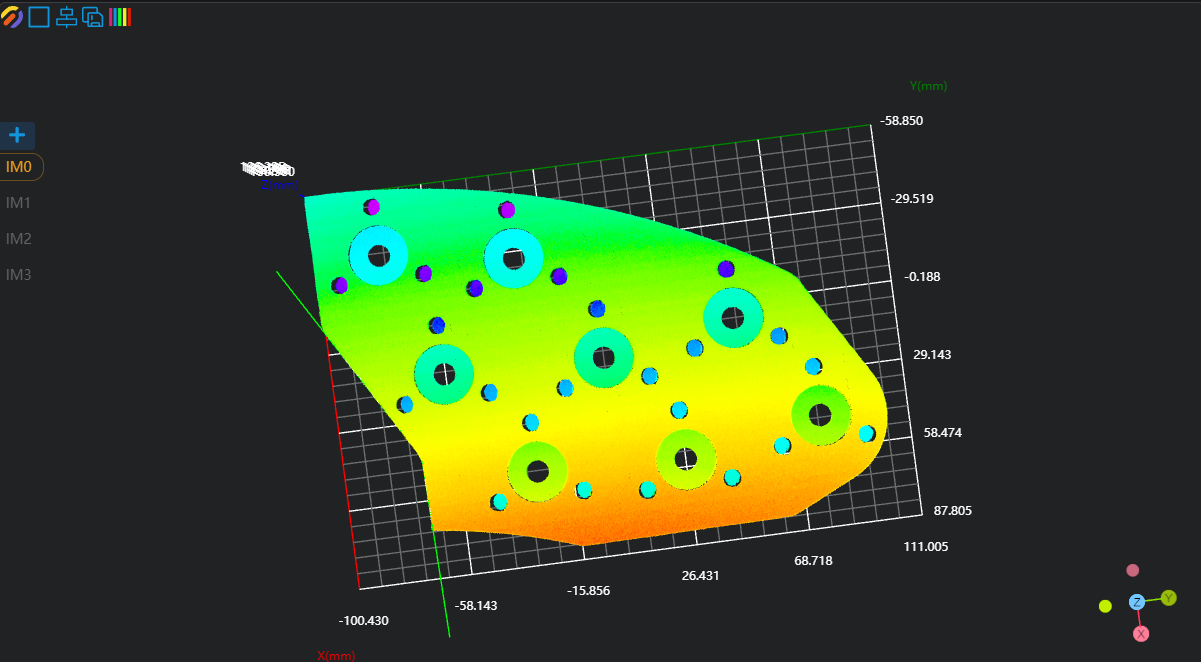
使用
3D几何交点工具,繫結上一步運算元變數輸出的兩條邊作為輸入幾何,輸出兩直線交點。使用
3D位置调整工具,繫結上一步運算元變數輸出的直線交點作為新原點調整點雲位置。
擬合平面
使用
3D区域工具,選擇擬合平面的區域。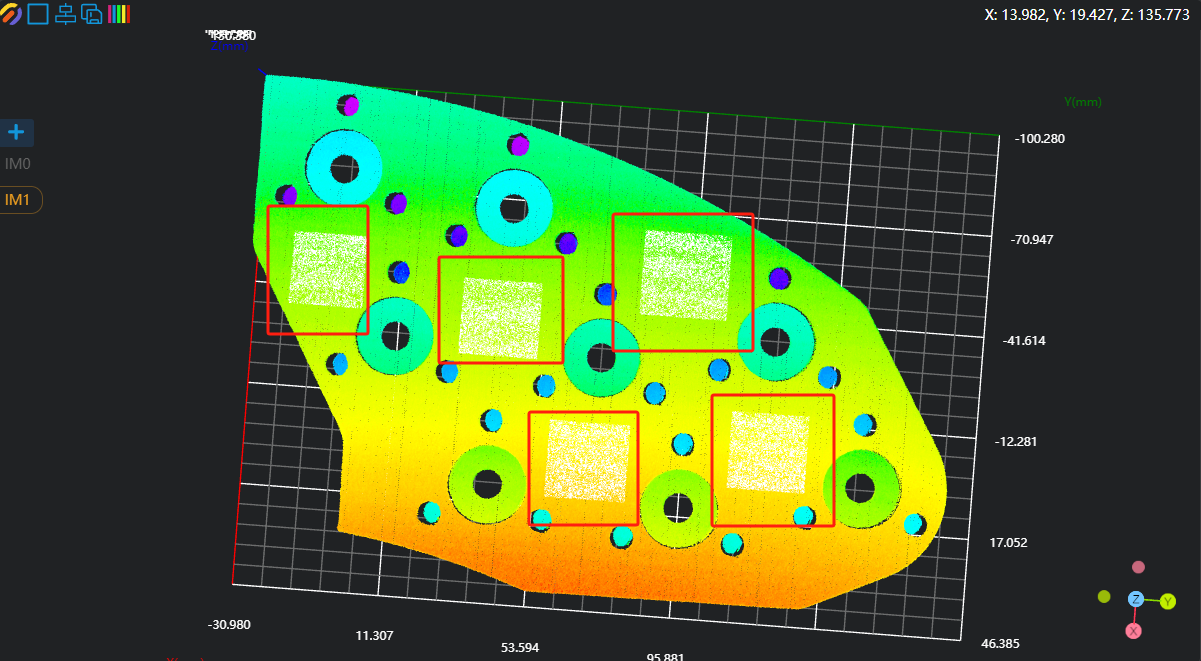
使用
3D平面工具,繫結上一步運算元輸出的變數區域作為輸入區域,擬合平面並將其設定為零平面。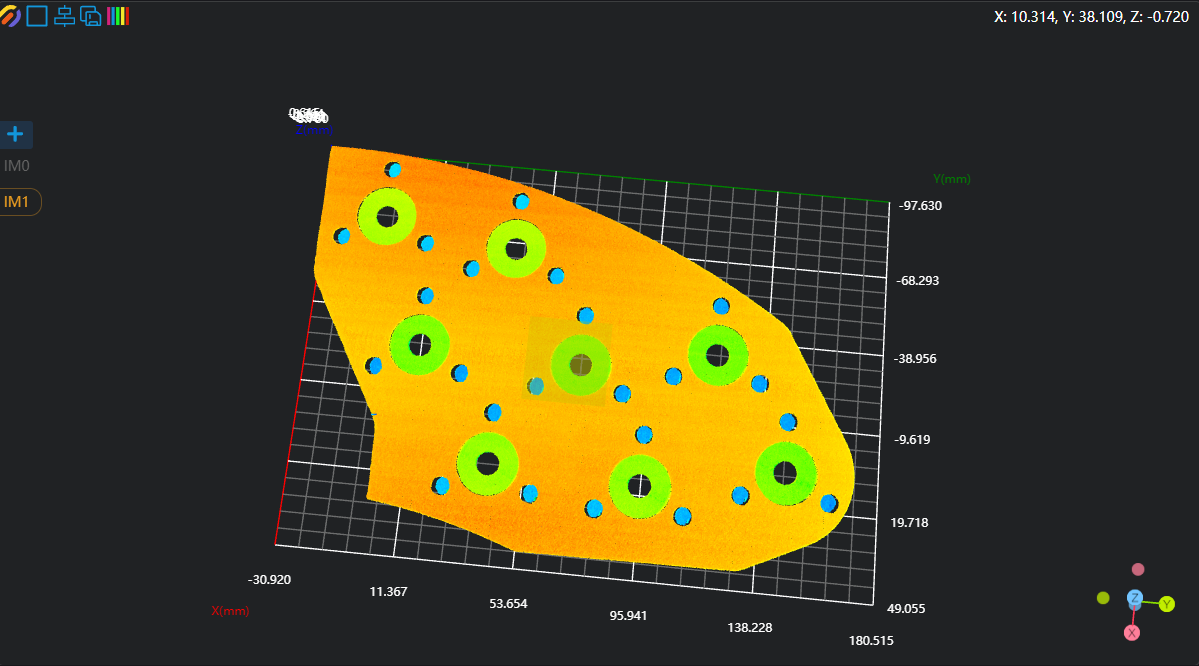
複製IM用於不同子程式呼叫
分別裁切IM1到IM2和IM3用於長度和寬度的測量
提示
使用並行呼叫子程式時,每個子程式需要在不同的IM執行。
三、長度及位置資訊測量
整體長度測量
使用
3D方形探针工具,分別找到左側直線與右側頂點。使用
3D距离工具,繫結上一步輸出的直線與點作為輸入的幾何1和幾何2,執行得到右側頂點到左側直線的距離。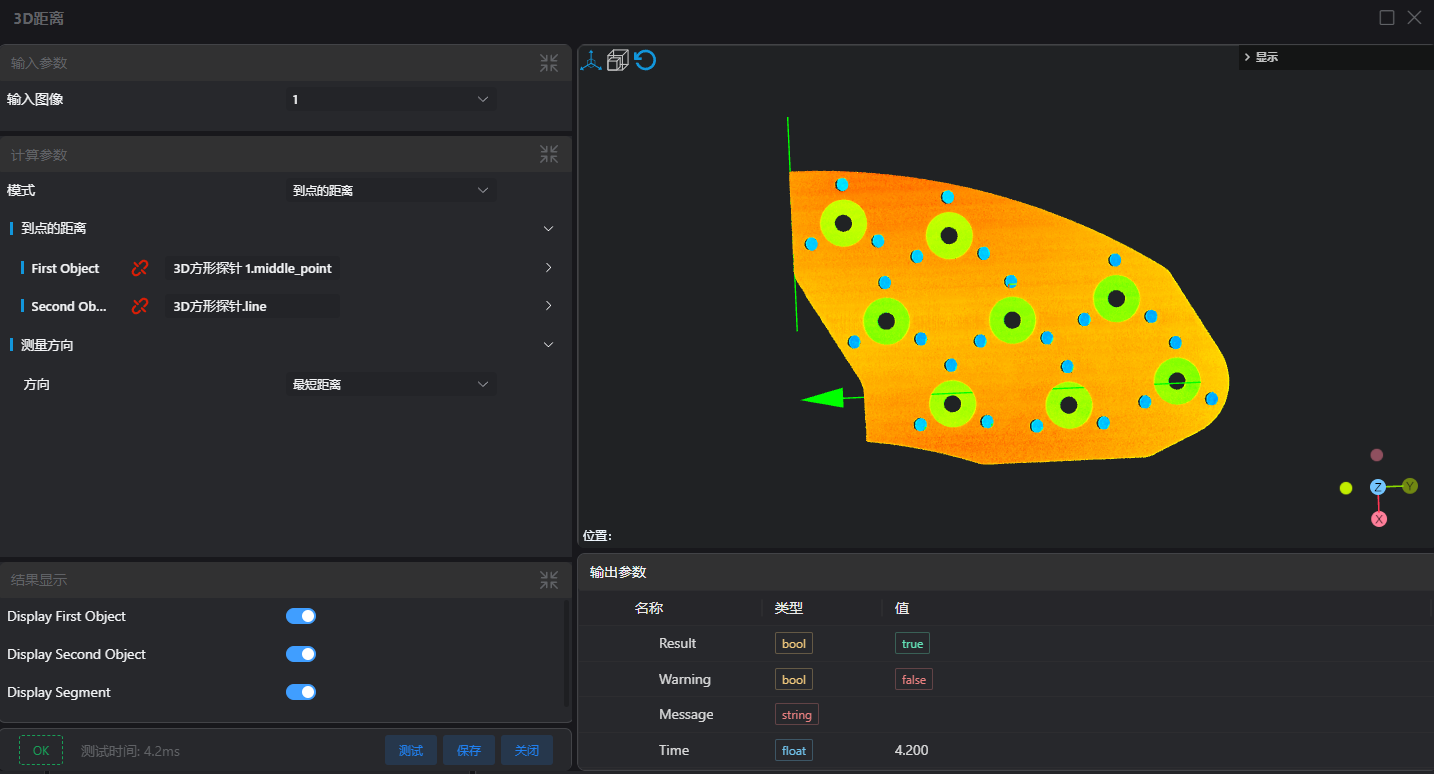
長度方向位置資訊
使用
3D方形探针工具,找到左側直線。使用八個
3D孔工具,輸出8個大圓孔的圓心位置資訊。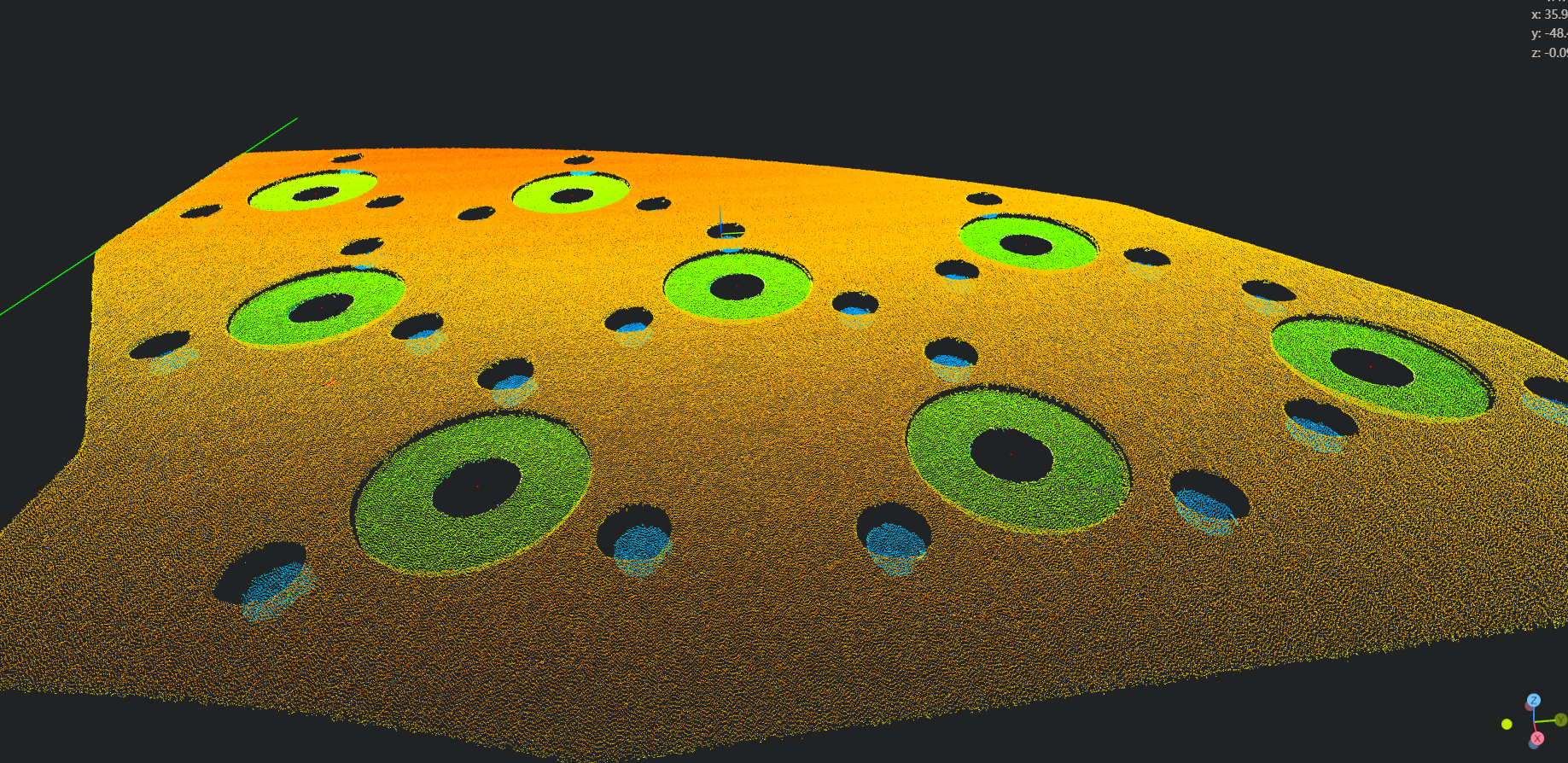
使用
3D距离工具,繫結直線與圓孔圓心位置作為輸入的幾何1與幾何2,分別計算8個圓孔到左側直線的距離。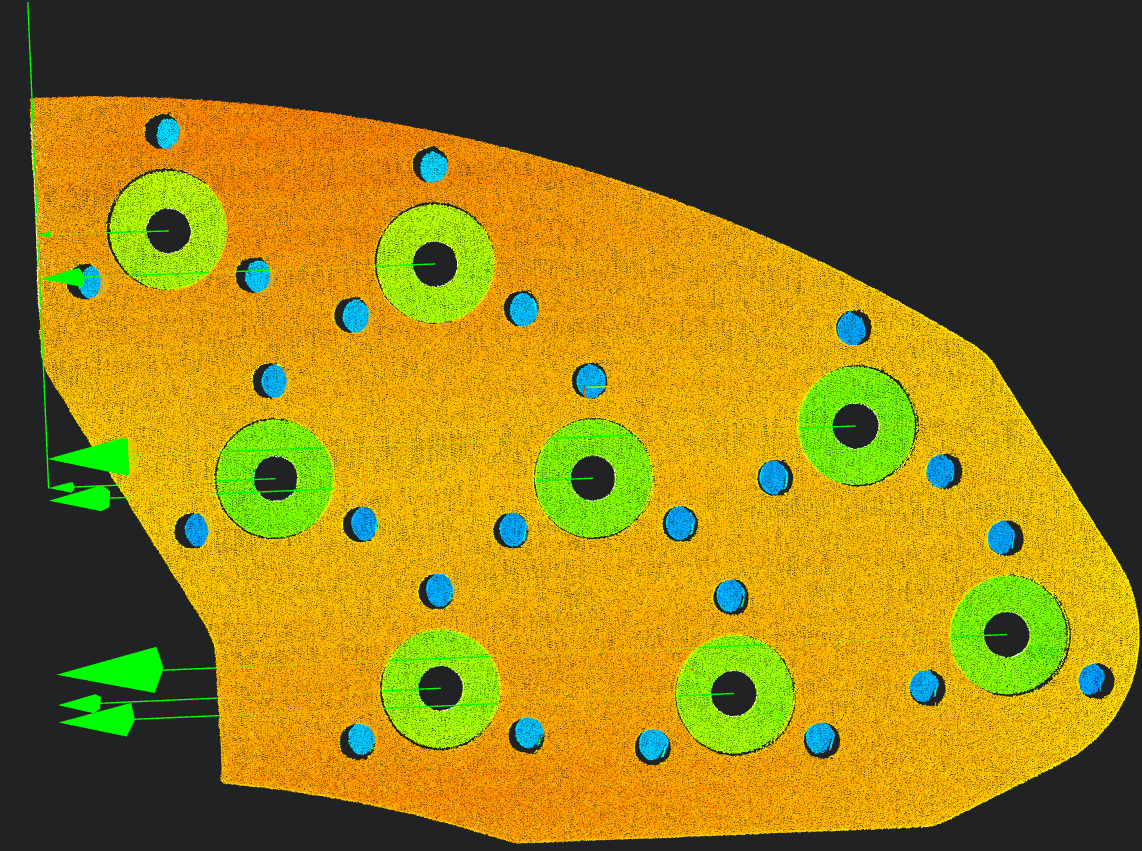
寬度方向位置資訊
使用
3D孔工具,輸出8個大圓孔下方左右兩側圓孔共16個小孔的圓心資訊。使用
3D距离工具,繫結兩個小孔圓心點作為輸入的幾何1和幾何2,測量大圓孔下方兩個小孔圓心之間的距離。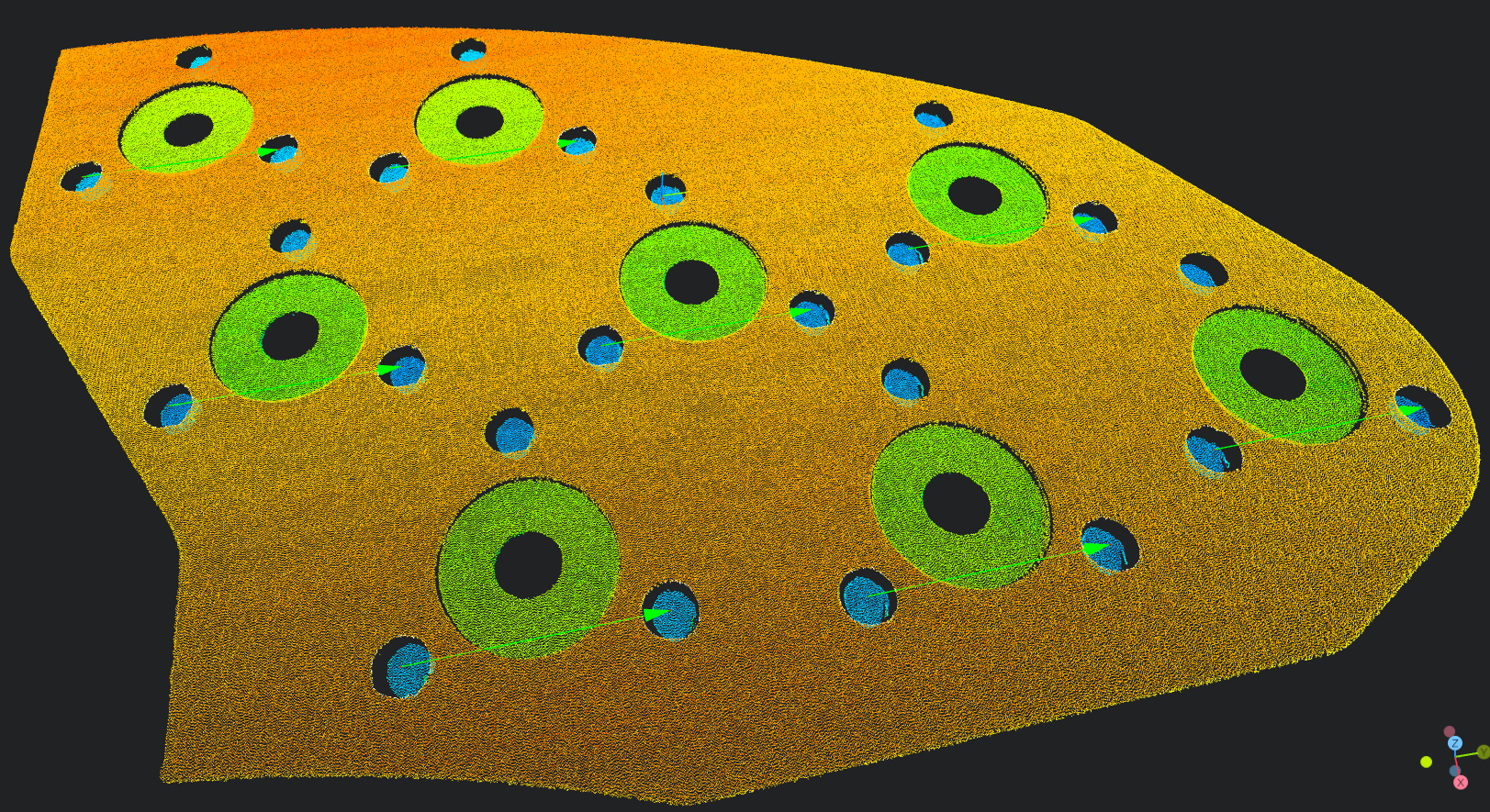
四、資料儲存
選擇lua语言脚本
繫結上一步輸出的運算元變數(閘片總長度,8個大圓孔長度,16個圓孔寬度)
將繫結變數分別拼接到三個字串
將拼接字串儲存至csv檔案中
設定資料顯示到IM
經驗
string.format 用於格式化字串 %.nf表示將浮點數格式化為保留 n 位小數。
pi = 3.14159 str = string.format("Pi is approximately %.3f", pi) print(str) -- 輸出: Pi is approximately 3.141
-- 总长度
-- 拼接数据
write = string.format("%.3f,",distance) .. "\n"
-- 将字符串写入文件中
WriteToFile("./DistanceAll.csv",write)

DrawText3D(1,'green',-97,-35,1,24,"总长度为:" .. string.format("%.3f",distance) .. "mm")

-- 圆孔长度方向位置信息
-- 生成用于拼接的字符串

write = ""
-- 拼接数据
write = write .. string.format("%.3f,",length1)
write = write .. string.format("%.3f,",length2)
write = write .. string.format("%.3f,",length3)
write = write .. string.format("%.3f,",length4)
write = write .. string.format("%.3f,",length5)
write = write .. string.format("%.3f,",length6)
write = write .. string.format("%.3f,",length7)
write = write .. string.format("%.3f,",length8)

-- "\n"表示换行
write = write .. "\n"
-- 将字符串写入文件中
WriteToFile("./DistanceY.csv",write)

-- 数据显示
DrawText3D(2,'green',-167,-35,1,24,"长度方向距离1为:" .. string.format("%.3f",length1) .. "mm")
DrawText3D(2,'green',-157,-35,1,24,"长度方向距离2为:" .. string.format("%.3f",length2) .. "mm")
DrawText3D(2,'green',-147,-35,1,24,"长度方向距离3为:" .. string.format("%.3f",length3) .. "mm")
DrawText3D(2,'green',-137,-35,1,24,"长度方向距离4为:" .. string.format("%.3f",length4) .. "mm")
DrawText3D(2,'green',-127,-35,1,24,"长度方向距离5为:" .. string.format("%.3f",length5) .. "mm")
DrawText3D(2,'green',-117,-35,1,24,"长度方向距离6为:" .. string.format("%.3f",length6) .. "mm")
DrawText3D(2,'green',-107,-35,1,24,"长度方向距离7为:" .. string.format("%.3f",length7) .. "mm")
DrawText3D(2,'green',-97,-35,1,24,"长度方向距离8为:" .. string.format("%.3f",length8) .. "mm")

-- 圆孔宽度方向位置度信息
-- 生成用于拼接的字符串
write = ""
-- 拼接数据
write = write .. string.format("%.3f,",width1)
write = write .. string.format("%.3f,",width2)
write = write .. string.format("%.3f,",width3)
write = write .. string.format("%.3f,",width4)
write = write .. string.format("%.3f,",width5)
write = write .. string.format("%.3f,",width6)
write = write .. string.format("%.3f,",width7)
write = write .. string.format("%.3f,",width8)

-- "\n"表示换行
write = write .. "\n"
-- 将字符串写入文件中
WriteToFile("./DistanceX.csv",write)

-- 数据显示
showText = string.format("宽度方向距离1为:%.3fmm\n",width1)
showText = showText .. string.format("宽度方向距离2为:%.3fmm\n",width2)
showText = showText .. string.format("宽度方向距离3为:%.3fmm\n",width3)
showText = showText .. string.format("宽度方向距离4为:%.3fmm\n",width4)
showText = showText .. string.format("宽度方向距离5为:%.3fmm\n",width5)
showText = showText .. string.format("宽度方向距离6为:%.3fmm\n",width6)
showText = showText .. string.format("宽度方向距离7为:%.3fmm\n",width7)
showText = showText .. string.format("宽度方向距离8为:%.3fmm\n",width8)
DrawText3D(3, 'green', 0, 0, 1, 300, showText)