
Load Image
Parameter Introduction
Calculation Parameters
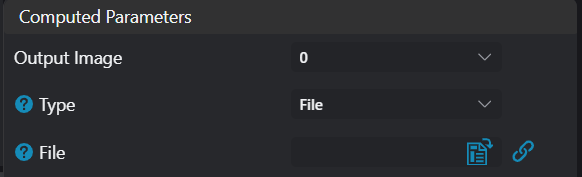
| Parameter | Range | Default Value | Description | Illustration |
|---|---|---|---|---|
| Output Image | 0-8 | 0 | Specify which IM to output the loaded image to | |
| Type | File/Directory | File | File: Read specified image file Directory: Read all supported image files in the directory. Each time the tool executes, switch to the next image file Mainly supported image formats include: bmp/jpeg/png/tiff |  |
Exception Troubleshooting
| No. | Exception Information | Corresponding Parameter | Solution |
|---|---|---|---|
| 1 | Parameter "xxx" cannot be empty | Parameter name | Enter the xxx parameter. |
| 2 | Folder "xxx" does not exist or cannot be accessed | File/Directory | Ensure the specified folder exists and has read permissions. |
| 3 | No supported files found in folder "xxx" | File/Directory | Ensure there are supported files in the specified folder. |
| 4 | File "xxx" does not exist or cannot be accessed | File/Directory | Ensure the specified file has read permissions, and its containing folder exists and has read permissions. |
| 5 | File format "xxx" is not supported | File/Directory | Ensure the specified file is in a supported format. |
| 6 | Failed to decode file "xxx" | Unknown exception, check file format and content. |