
Load 3D Point Cloud
Parameter Introduction
Calculation Parameters
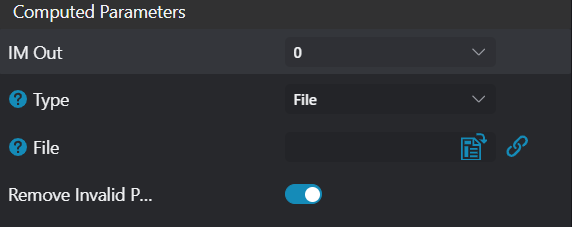
| Parameter | Range | Default Value | Description | Illustration |
|---|---|---|---|---|
| Output Image | 0-8 | 0 | Specify which IM to output the loaded point cloud to | |
| Type | File/Directory | File | File: Read specified point cloud file Directory: Read all supported point cloud files in the directory. Each time the tool executes, it switches to the next point cloud file Supported formats: pcd/ply/txt/csv | 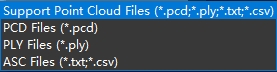 |
| File | Specify file path | |||
| Directory | Specify folder path | |||
| Remove Invalid Points (PCD only) | true/false | true | Remove invalid points (points with NAN values) from point cloud file |
Format Description
txt format:
- Each line has 3 values representing x, y, z coordinates respectively
- Values are separated by spaces or commas
lua
8.290000 0.000000 -1.734610
8.300000 0.000000 -1.733410
8.310000 0.000000 -1.733290
8.320000 0.000000 -1.733370
8.330000 0.000000 -1.733310
8.340000 0.000000 -1.733010
8.350000 0.000000 -1.732500csv format:
- Each line has 3 values representing x, y, z coordinates respectively
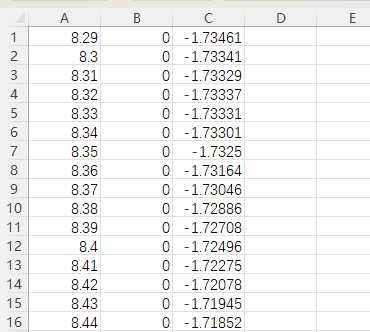
Exception Troubleshooting
| No. | Exception Information | Corresponding Parameter | Solution |
|---|---|---|---|
| 1 | Parameter "xxx" cannot be empty | Parameter name | Input the xxx parameter. |
| 2 | Folder "xxx" does not exist or cannot be accessed | File/Directory | Create the folder or switch to a folder with read permissions. |
| 3 | No supported point cloud files found in folder "xxx" | File/Directory | Change to a folder containing supported point cloud files. |
| 4 | File "xxx" does not exist or cannot be accessed | File/Directory | Create the file or switch to a file with read permissions. |