
PekatVision Surface Inspection
Parameter Introduction
Input Parameters

| Parameter | Range | Default Value | Description | Illustration |
|---|---|---|---|---|
| Input Image | 0-8 | 0 | The IM number for image input |
Calculation Parameters
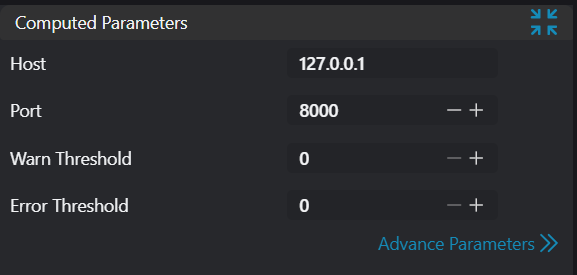
| Parameter | Range | Default Value | Description | Illustration |
|---|---|---|---|---|
| Host | 127.0.0.1 | PekatVision service host IP address | ||
| Port | 0-65535 | 8000 | PekatVision service host port | |
| Warning Output Threshold | 0 | Operator outputs warning when target count exceeds this threshold. Disabled when set to 0 | ||
| Error Output Threshold | 0 | Operator outputs error when target count exceeds this threshold. Disabled when set to 0 | ||
| API Key | PekatVision service API key |
Exception Troubleshooting
| No. | Exception Information | Corresponding Parameter | Solution |
|---|---|---|---|
| 1 | Image in IMxxx is not a 2D image | IM index | Ensure the image in the specified IM is a 2D image. |
| 2 | Input host "xxx" is not a valid IPv4 address | Host | Ensure the format of the host parameter is a valid IPv4 address. |
| 3 | Failed to connect to PekatVision service "xxx" | Host:Port | Ensure the specified PekatVision service is running normally and accessible. |
| 4 | Failed to encode input image to xxx format | Image format | Rare occurrence, input image format cannot be converted to xxx format. |
| 5 | Inference failed, error code: xxx | Error code | Unknown exception, determine error cause based on error code. |
| 6 | Inference failed, PekatVision service processing feature not enabled | Enable data processing in PekatVision service. | |
| 7 | Detected more than xxx targets | Warning Output Threshold/Error Output Threshold |