
Hypersen HPS-DBL Image Acquisition
Parameter Introduction
Calculation Parameters
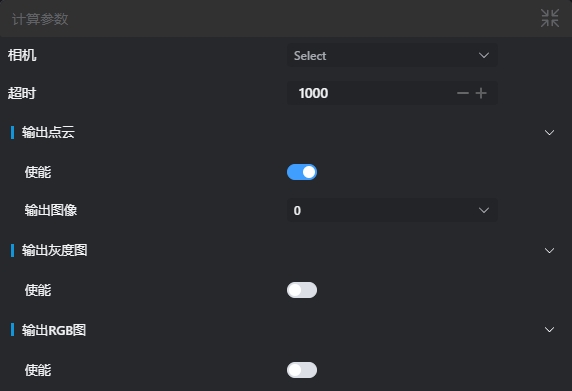
| Parameter | Range | Default Value | Description | Diagram |
|---|---|---|---|---|
| Camera | - | - | Select the camera device that has been added and enabled | |
| Timeout | ≥ 0 | 1000 | Image reception timeout (in milliseconds). 0 means waiting indefinitely until the camera image is received | |
| Output Point Cloud. Enable | true/false | true | When enabled, the camera outputs a point cloud image | |
| Output Point Cloud. Output Image | 0-8 | 0 | The IM number where the camera's output image is displayed | |
| Output Grayscale Image. Enable | true/false | false | When enabled, the camera outputs a grayscale image | |
| Output Grayscale Image. Output Image | 0-8 | 0 | The IM number where the camera's output image is displayed | |
| Output RGB Image. Enable | true/false | false | When enabled, the camera outputs an RGB image | |
| Output RGB Image. Output Image | 0-8 | 0 | The IM number where the camera's output image is displayed |
Troubleshooting
| No. | Error Message | Corresponding Parameter | Solution |
|---|---|---|---|
| 1 | The parameter "xxx" cannot be empty | Parameter Name | Enter the xxx parameter. |
| 2 | Device "xxx" does not exist | Device Name | Modify device parameters or add the corresponding device. |
| 3 | Device "xxx" is not connected | Device Name | Ensure the specified device is connected. |
| 4 | Device "xxx" is disconnected | Device Name | Reconnect the specified device. |
| 5 | Image acquisition initialization failed for device "xxx" | Device Name | Check the device status and restart the device if necessary. |
| 6 | Image acquisition timed out | - | 1. Check the device status 2. Adjust device parameters to reduce image acquisition time 3. Extend the image acquisition timeout duration. |
| 7 | Image acquisition failed, error code "xxx" | Error Code | Unknown exception; determine the cause of the failure based on the error code. |
| 8 | User forced stop | - | - |