
Gocator Control
Batch set some common settings of Gocator. The camera will start automatically after the settings are completed.
Parameter Introduction
Calculation Parameters
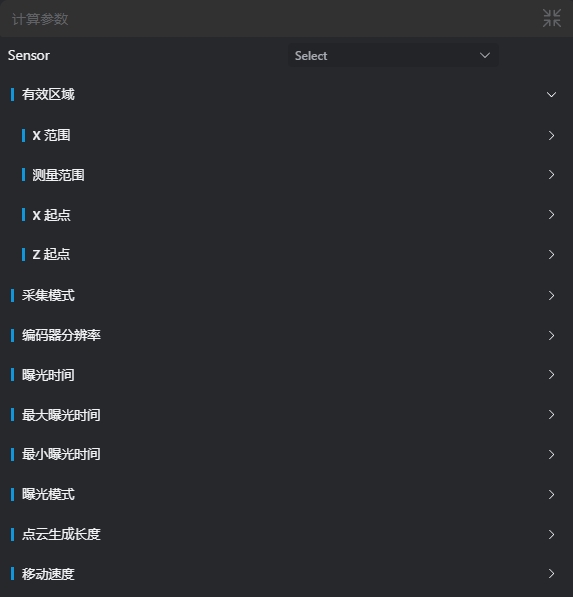
| Parameter | Range | Default Value | Description | Diagram |
|---|---|---|---|---|
| Sensor | - | - | - | - |
| Effective Area (X Range). Modify | true/false | false | When enabled, the X Range value is set to the camera parameters | |
| Effective Area (X Range). X Range | - | 0.000 | - | |
| Effective Area (Measurement Range). Modify | true/false | false | When enabled, the Measurement Range value is set to the camera parameters | |
| Effective Area (Measurement Range). Measurement Range | - | 0.000 | - | |
| Effective Area (X Start). Modify | true/false | false | When enabled, the X Start value is set to the camera parameters | |
| Effective Area (X Start). X Start | - | 0.000 | - | |
| Effective Area (Z Start). Modify | true/false | false | When enabled, the Z Start value is set to the camera parameters | |
| Effective Area (Z Start). Z Start | - | 0.000 | - | |
| Acquisition Mode. Modify | true/false | false | When enabled, the Acquisition Mode value is set to the camera parameters | |
| Acquisition Mode. Acquisition Mode | Profile / Point Cloud | Profile | - | |
| Encoder Resolution. Modify | true/false | false | When enabled, the Encoder Resolution value is set to the camera parameters | |
| Encoder Resolution. Encoder Resolution | - | 0.000 | - | |
| Exposure Time. Modify | true/false | false | When enabled, the Exposure Time value is set to the camera parameters | |
| Exposure Time. Exposure Time | - | 0.000 | - | |
| Maximum Exposure Time. Modify | true/false | false | When enabled, the Maximum Exposure Time value is set to the camera parameters | |
| Maximum Exposure Time. Maximum Exposure Time | - | 0.000 | - | |
| Minimum Exposure Time. Modify | true/false | false | When enabled, the Minimum Exposure Time value is set to the camera parameters | |
| Minimum Exposure Time. Minimum Exposure Time | - | 0.000 | - | |
| Exposure Mode. Modify | true/false | false | When enabled, the Exposure Mode value is set to the camera parameters | |
| Exposure Mode. Exposure Mode | Single Exposure / Multiple Exposures / Dynamic Exposure | Single Exposure | - | |
| Point Cloud Growth Length. Modify | true/false | false | When enabled, the Point Cloud Growth Length value is set to the camera parameters | |
| Point Cloud Growth Length. Point Cloud Growth Length | - | 0.000 | - | |
| Moving Speed. Modify | true/false | false | When enabled, the Moving Speed value is set to the camera parameters | |
| Moving Speed. Moving Speed | - | 0.000 | - |
Troubleshooting
| No. | Error Message | Corresponding Parameter | Solution |
|---|---|---|---|
| 1 | The parameter "xxx" cannot be empty | Parameter Name | Enter the xxx parameter. |
| 2 | Device "xxx" does not exist | Device Name | Modify device parameters or add the corresponding device. |
| 3 | Device "xxx" is not connected | Device Name | Ensure the specified device is connected. |
| 4 | Failed to set parameter "xxx" to device "xxx"; data is out of range. Please check the Gocator log for details | Parameter Name, Device Name | Modify the set parameter value to the correct range according to the Gocator log. |
| 5 | Failed to set parameter "xxx" to device "xxx". Please check the Gocator log for details | Parameter Name, Device Name | Modify the set parameter value according to the Gocator log. |
| 6 | Failed to stop device "xxx" | - | Check the status of the Gocator camera and restart the camera if necessary. |