
Image Acquisition
Parameter Introduction
Calculation Parameters
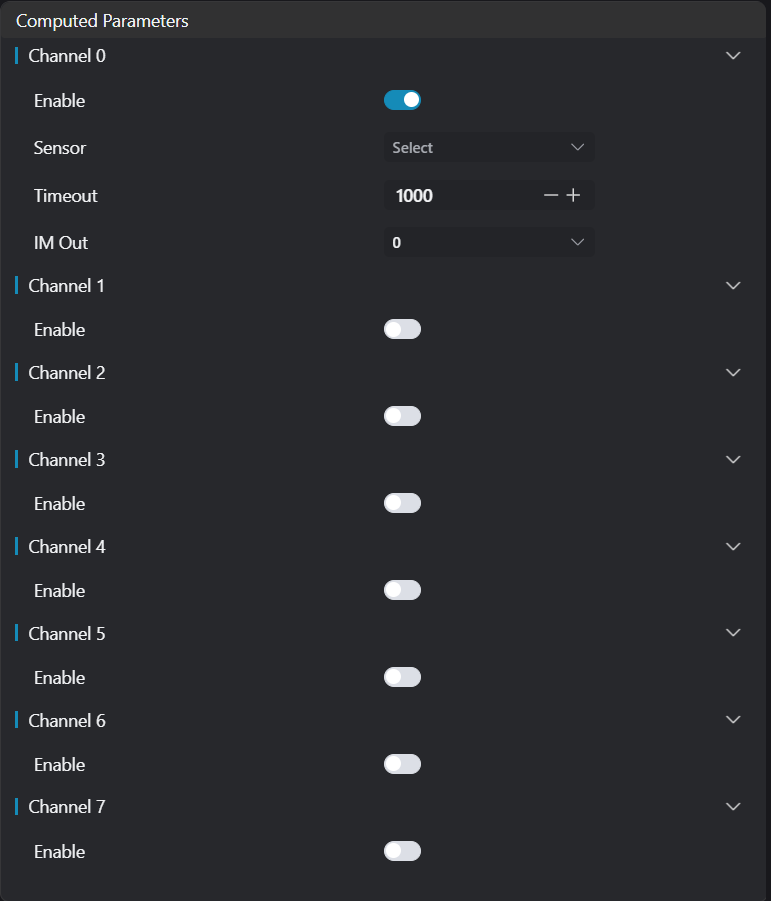
| Parameter | Range | Default Value | Description | Diagram |
|---|---|---|---|---|
| Channel 0 | true/false | true | When enabled, it can connect to the camera for image acquisition | |
| Camera | - | - | Select the camera device that has been added and enabled | |
| Timeout | ≥ 0 | 1000 | Image reception timeout (in milliseconds). 0 means waiting indefinitely until the camera image is received | |
| Output Image | 0-8 | 0 | The IM number where the camera's output image is displayed |
Troubleshooting
| No. | Error Message | Corresponding Parameter | Solution |
|---|---|---|---|
| 1 | The parameter "{1}" of {0} cannot be empty | Parameter Name | Enter the xxx parameter. |
| 2 | The {0} of all enabled channels cannot be duplicated | - | Check that different channels do not select the same device |
| 3 | Image acquisition failed for Channel {0}; device "{1}" does not exist | Device Name | Modify device parameters or add the corresponding device. |
| 4 | Image acquisition failed for Channel {0}; device "{1}" is not connected | Device Name | Ensure the specified device is connected. |
| 5 | Image acquisition failed for Channel {0}; device "{1}" is disconnected | Device Name | Reconnect the specified device. |
| 6 | Image acquisition failed for Channel {0}; device "{1}" is busy | - | Wait for the device to be idle, or check if the device is occupied by other processes. |
| 7 | Image acquisition failed for Channel {0}; initialization of image acquisition for device "{1}" failed | - | Recheck the device driver, restart the device, or reconfigure the camera connection parameters. |
| 8 | Image acquisition failed for Channel {0}; image acquisition timed out | Timeout | Extend the timeout duration appropriately, or check if the camera is functioning normally and the network (if applicable) is stable. |
| 9 | Image acquisition failed for Channel {0}; error code "{1}" | - | Refer to the camera's official documentation to troubleshoot based on the specific error code. |
| 10 | User forced stop | - | Resume the image acquisition process, or restart the operation if necessary. |