
Send String
Parameter Introduction
Calculation Parameters
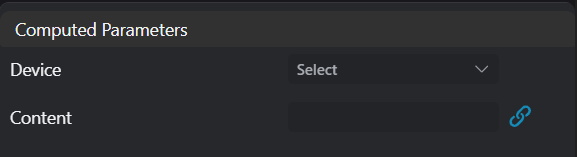
| Parameter | Range | Default Value | Description | Illustration |
|---|---|---|---|---|
| Activation | true/false | true | ||
| Invert Activation | true/false | false | ||
| Device | Select device from the device listNote: Available devices must meet 2 conditions: 1. Device belongs to Communication group; 2. Device is enabled | |||
| Content | String content to sendNote: Chinese content only supports UTF8 encoding format |
Special Character Description
When sending special characters via TCP, they need to be sent according to the content in the table below.
| Special Character Meaning | Abbreviation | Hexadecimal Representation |
|---|---|---|
| Null character | <NUL> | 0x00 |
| Start of Heading | <SOH> | 0x01 |
| Start of Text | <STX> | 0x02 |
| End of Text | <ETX> | 0x03 |
| End of Transmission | <EOT> | 0x04 |
| Enquiry | <ENQ> | 0x05 |
| Acknowledge/Response/Received Notice | <ACK> | 0x06 |
| Bell | <BEL> | 0x07 |
| Backspace | <BS> | 0x08 |
| Horizontal Tab | <HT> | 0x09 |
| Line Feed | <LF> | 0x0A |
| Vertical Tab | <VT> | 0x0B |
| Form Feed | <FF> | 0x0C |
| Carriage Return | <CR> | 0x0D |
| Shift Out | <SO> | 0x0E |
| Shift In | <SI> | 0x0F |
| Data Link Escape | <DLE> | 0x10 |
| Device Control 1/Transmission Start | <DC1> | 0x11 |
| Device Control 2 | <DC2> | 0x12 |
| Device Control 3/Transmission Break | <DC3> | 0x13 |
| Device Control 4 | <DC4> | 0x14 |
| Negative Acknowledge/Abnormal Response/Reject | <NAK> | 0x15 |
| Synchronous Idle | <SYN> | 0x16 |
| End of Transmission Block/Block Transmission Terminate | <ETB> | 0x17 |
| Cancel | <CAN> | 0x18 |
| End of Medium/Medium Storage Full/Medium Interrupt | <EM> | 0x19 |
| Substitute | <SUB> | 0x1A |
| Escape | <ESC> | 0x1B |
| File Separator | <FS> | 0x1C |
| Group Separator | <GS> | 0x1D |
| Record Separator | <RS> | 0x1E |
| Unit Separator | <US> | 0x1F |
| Space | <SP> | 0x20 |
Example
When the string content to send is: "hello \r\n AI-Vision", the content parameter should be written as: "hello <CR><LF> AI-Vision"
Exception Troubleshooting
| No. | Exception Information | Corresponding Parameter | Solution |
|---|---|---|---|
| 1 | Parameter "xxx" cannot be empty | Parameter name | Input the xxx parameter. |
| 2 | Device "xxx" does not exist | Device name | Modify device parameters or add corresponding device. |
| 3 | Device "xxx" is not connected | Device name | Ensure specified device is connected. |
| 4 | Send function of device "xxx" is disabled | Only occurs with UDP devices. Enable send function of specified device and specify target address. | |
| 5 | Send failed | Unknown exception, check device status. | |
| 6 | User forced stop |