
Write to CSV
Write data to a CSV file.
Note
- When the specified CSV file does not exist or is empty, the header will be automatically output in the first row.
- To prevent parsing errors in Excel or WPS caused by special characters in string data, string data will be wrapped in double quotes when output.
- When the set timestamp format conforms to a certain standard, Excel and WPS will automatically parse and display it as a date format, and the displayed content may differ from the actual data.
- The encoding of the output data is UTF-8. Since Excel parses strings in CSV files using ANSI encoding (GB2312 encoding in simplified Chinese systems), Chinese characters may display as garbled characters in Excel.
Parameter Introduction
Calculation Parameters
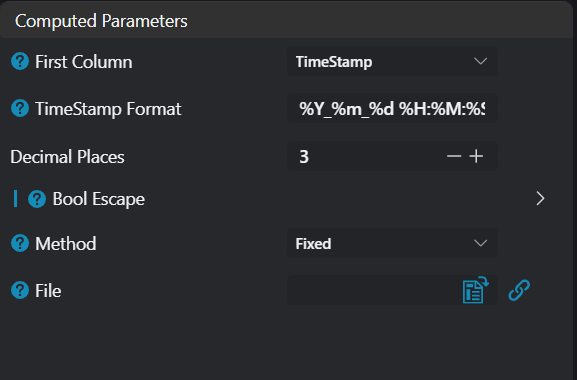
| Parameter | Range | Default Value | Description | Diagram |
|---|---|---|---|---|
| First Column Content | None / Timestamp | Timestamp | Used to set the automatically generated content of the first column | |
| Time Format | - | %Y_%m_%d %H:%M:%S.%i | When First Column Content is Timestamp, set the timestamp format | |
| Decimal Places | 0-6 | 3 | Set the number of decimal places when outputting floating-point numbers | |
| Boolean Escape.True | - | OK | Set the text output when the boolean value is true | |
| Boolean Escape.False | - | NG | Set the text output when the boolean value is false | |
| Method | Fixed File / Continuous Files | Fixed File | Fixed File: Save to the specified file Continuous: Save to the specified folder, and the file name is automatically generated according to the configuration. | |
| File | - | - | Specify the file path | |
| Directory | - | - | Specify the folder path | |
| Prefix | - | Data | Prefix of the automatically generated file name | |
| Stamp | - | %Y_%m_%d | Set the format of the stamp | |
| Auto-Classification.Enable | true/false | false | Automatically generate and save to subfolders according to the configuration | |
| Auto-Classification.Method | By Date / Custom | By Date | Select the classification method | |
| Auto-Classification.Date Format | - | %Y_%m_%d | Set the date format; leaving it blank is equivalent to %Y_%m_%d | |
| Auto-Classification.Custom | - | %Y_%m_%d/%H_%M_%S | Custom folder structure; time can be represented using placeholders |
Table Design

| Parameter | Range | Default Value | Description | Diagram |
|---|---|---|---|---|
| Serial Number | - | - | - | - |
| Name | - | column0 | The header name of the output column | |
| Type | - | - | Display the actual type of the parameter bound to Value | |
| Value | - | - | The value output in this column; only allows binding values of type bool/int/float/string |
Troubleshooting
| No. | Error Message | Corresponding Parameter | Solution |
|---|---|---|---|
| 1 | The parameter "xxx" cannot be empty | Parameter Name | Enter the value for the "xxx" parameter. |
| 2 | The folder "xxx" does not exist or is inaccessible | Directory | Ensure the specified folder exists and has read/write permissions. |
| 3 | The file "xxx" cannot be created or written to | File | Ensure the specified file has read/write permissions, and the folder where it is located exists and has read/write permissions. |
| 4 | Failed to write data to the file "xxx". | File / Directory | Unknown exception; it may be that the file is occupied by other software. |