
Application of Logical Operators
Project Flow
1. Initialization
Select the Lua Language Script tool and create three global variables of different types for judgment.
SetFloatVariable("judgeNumber", 10.000)
SetStringVariable("judgeString", "it is true")
SetBoolVariable("judgeBool", true)2. Application of Different Logical Operators
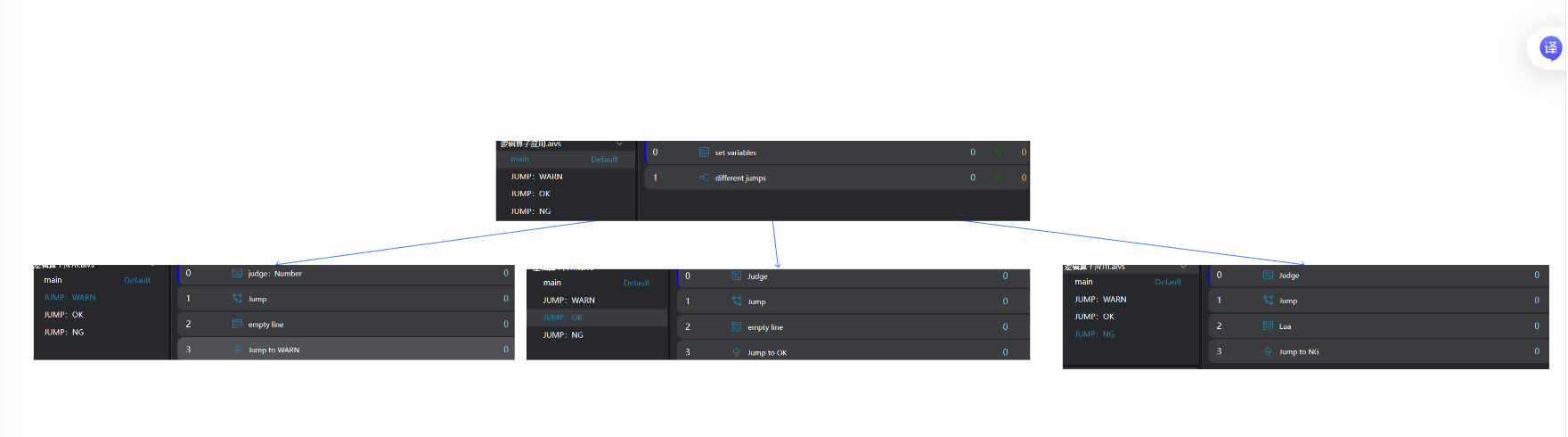
Jump: WARN
Select the
Judgmenttool and set a deviation warning to make the tool's running result WARN. Select the data type for judgment as Number, and bind the Number-type global variable set by theLua Language Scripttool as the target Number.Select the
Jumptool and set the jump target to the marker WARN.
- Bind the output variable Warning value of the
Judgmenttool as the activation value. - When the running result of the previous judgment tool is WARN, the output variable Warning value is true, the activation value is true, and the jump to the corresponding target is triggered.
Select the
Lua Language Scripttool and manually add a blank line.Select the
Markertool and set a WARN marker for theJumptool to jump to.
Jump: OK
- Select the
Judgmenttool and set parameters to make the tool's running result OK.
- Select the data type for judgment as String, and bind the String-type global variable set by the
Lua Language Scripttool as the target String. - Enter the string content for comparison in the Expected String, which should be the same as the value of the String-type global variable.
- Select the
Jumptool and set the jump target to the marker OK.
- Bind the output variable Result value of the
Judgmenttool as the activation value. - When the running result of the previous judgment tool is OK, the output variable Result value is true, the activation value is true, and the jump to the corresponding target is triggered.
Select the
Lua Language Scripttool and manually add a blank line.Select the
Markertool and set an OK marker for theJumptool to jump to.
Jump: NG
- Select the
Judgmenttool and set parameters to make the tool's running result NG.
- Select the data type for judgment as Bool, and bind the Bool-type global variable set by the
Lua Language Scripttool as the target Bool. - Enter the Bool value for comparison in the Expected Bool, which should be different from the value of the Bool-type global variable.
- Select the
Jumptool and set the jump target to the marker NG.
- Bind the output variable Result value of the
Judgmenttool as the activation value. - Enable inverted activation.
- When the running result of the previous judgment tool is NG, the output variable Result value is false, the activation value is false, and inverted activation is enabled to trigger the jump to the corresponding target when the activation value is false.
Select the
Lua Language Scripttool and manually add a blank line.Select the
Markertool and set an NG marker for theJumptool to jump to.