
Recipe Management Page
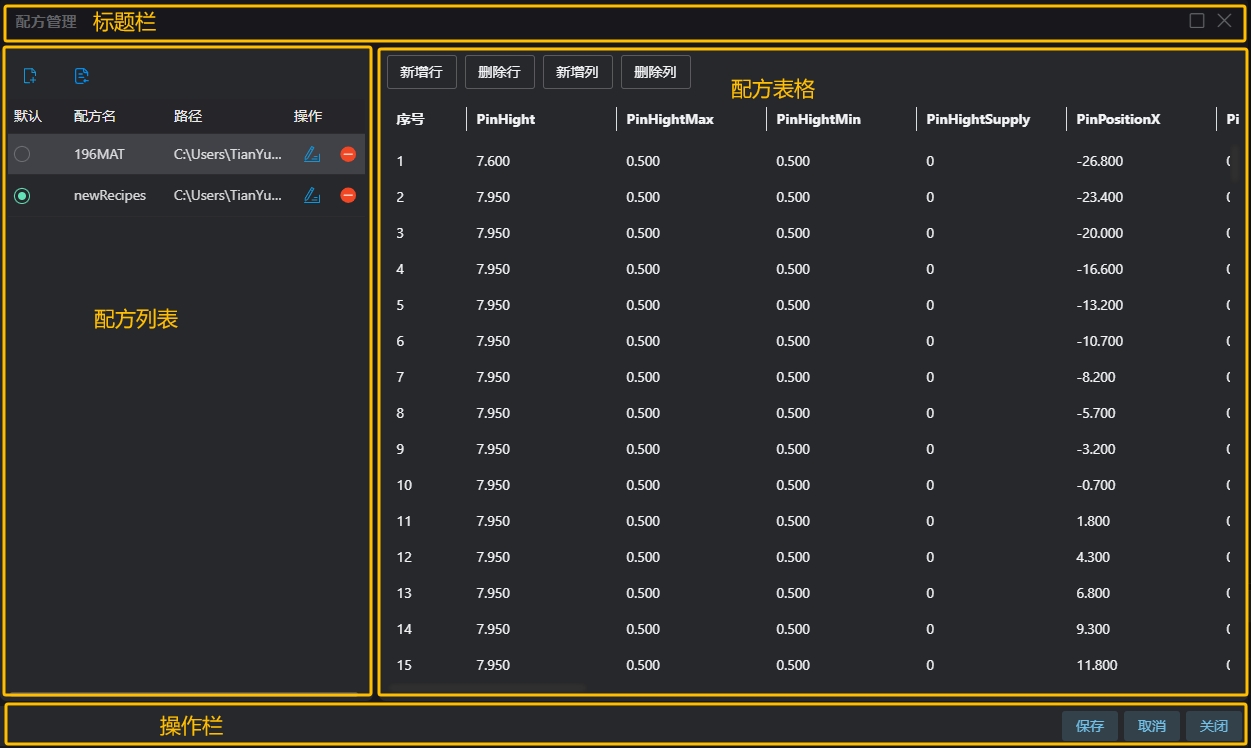
Create or edit data recipes
Title Bar
| Name | Description |
|---|---|
| System Parameters | Displays the current page name and maximize/close buttons |
Recipe List
| Icon | Name | Description |
|---|---|---|
 | Create Recipe | Create a new recipe |
 | Import Recipe | Add an existing recipe to the current list. The recipe can be created by anyone as long as it meets the Json format |
| Default | The recipe used by default when the project executesWhen there are multiple recipes in the project, they can be switched using the recipe switching tool | |
| Recipe Name | User-defined name. Select the corresponding recipe name in the recipe switching tool | |
| Path | The location of the recipe on disk, supports relative pathsNote: When the path is too long, it will be displayed with ellipsis. Hover the mouse over the path to see the full path | |
 | Edit | Modify recipe name or path |
 | Confirm Edit | Save the modified recipe name or path |
 | Cancel Edit | Discard changes |
 | Delete | Remove this recipe from the project (the recipe file still exists on disk) |
Recipe Table
| Name | Description |
|---|---|
| Add Row | Add a new row at the bottom of the current recipe table |
| Delete Row | First select a recipe parameter, then click Delete Row to remove the row containing the selected parameter |
| Add Column | Add a new column to the rightmost side of the current recipe table, all parameter values set to 0 |
| Delete Column | First select a recipe parameter, then click Delete Column to remove the column containing the selected parameter |
| Sequence Number | Row number in the table, starting from 0 |
| Other Fields | Names of various fields defined in the recipe and their corresponding values. Double-click to enter edit mode, click elsewhere to complete editing. |
Action Bar
| Name | Description |
|---|---|
| Save | Save the currently modified recipe content and close the recipe table |
| Cancel | Discard recipe changes and close the recipe table |
| Close | Close the Recipe Management page without saving any content |